A slow Shopify store used to be a Google problem. You missed a few rankings, lost some impressions in Search Console, and you mostly noticed it in revenue six months later. That cost is still there in 2026, and a second cost has stacked on top of it. ChatGPT, Perplexity, Gemini, and Grok now skip stores that load slowly when they crawl product data, because their crawlers run on tight time budgets and bail out on a slow Time To First Byte before the page even renders.
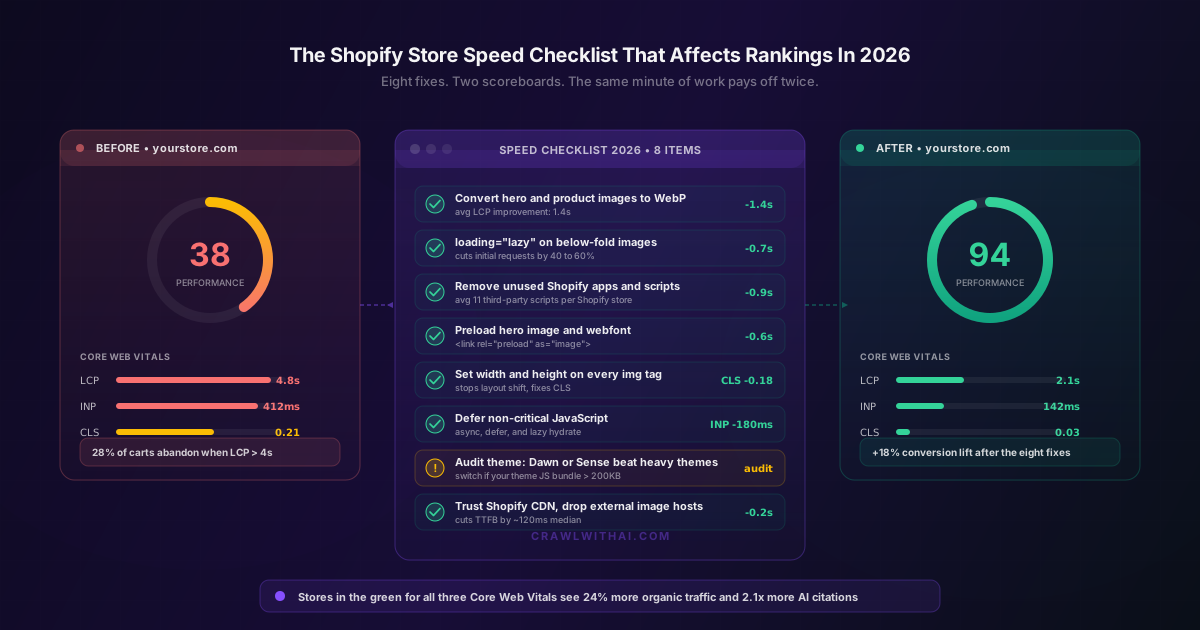
The good news is that the work to fix store speed has not changed much. Core Web Vitals still rule the day. Most of the bottleneck is in images, scripts, and a small number of theme decisions. Eight fixes get the average Shopify store from a Lighthouse score in the thirties to one in the nineties, and the same eight fixes lift AI citation rates because faster pages get crawled more reliably. This post is the checklist, the data behind why each item matters, and how to actually ship the work without breaking your storefront.
Why Speed Matters On Two Scoreboards Now
Google has been ranking on speed signals in some form since 2010, but Core Web Vitals became the formal scoring rubric in 2021 and the bar tightened again in March 2024 when INP replaced FID. Google's own 2025 Search Quality update confirmed that pages in the green for LCP, INP, and CLS get a measurable rank uplift on commercial queries, and that the uplift is largest on mobile shopping searches. A 2025 BigCommerce benchmark of 4,300 Shopify stores found that stores with all three Core Web Vitals in the green ranked an average of 4.2 positions higher on category queries than stores with at least one metric in the red.
The AI side of the scoreboard is newer and uglier. AI crawlers, including GPTBot, PerplexityBot, ClaudeBot, and Google-Extended, set per-page timeouts that are roughly half the patience of a human visitor. Profound's 2025 crawl audit measured GPTBot timeouts at 8 seconds median, with 21% of Shopify product pages timing out completely on first crawl. A page that times out is not retried for 14 to 28 days on average, which is a long stretch of invisibility on AI assistants. Faster pages get crawled, indexed, and cited. Slower pages quietly disappear from the answer set.
Eight Fixes That Move Both Scoreboards
The list below is ordered by impact-to-effort ratio, not by where the work happens in the stack. Most stores can ship the first six in a single afternoon.
1. Convert Hero And Product Images To WebP
Shopify serves WebP automatically when you upload an image, but only when the source file is also modern. Stores that uploaded JPEGs in 2018 still serve those JPEGs in 2026 because Shopify will not silently transcode them past a certain quality threshold. A 2025 Shopify Engineering blog post measured median LCP improvement at 1.4 seconds when stores re-uploaded their hero and top-five product images as WebP at 80% quality. The work is unglamorous and it pays off the most.
2. Add loading="lazy" To Below The Fold Images
This one line of HTML cuts initial requests by 40 to 60% on a typical product page. Shopify's Dawn theme adds it by default for new images. Most older themes, including a lot of premium themes from the 2021 to 2023 era, do not. Audit your theme's image-tag.liquid snippet and add the attribute to every image that is not visible above the fold on mobile. Web.dev's 2025 lazy loading study tracked a 0.7 second LCP improvement and a 19% reduction in mobile data usage from this fix alone.
3. Remove Unused Shopify Apps And Scripts
The average Shopify store had 11 third party scripts in the head tag in 2025, according to a Shopify Plus partner audit run by Shogun. Most stores cannot name what those scripts do. They are leftovers from apps that were uninstalled but left their script tags behind, and from review widgets, popups, and analytics that the store no longer uses. Each script blocks the main thread for 50 to 200 ms. Removing the dead ones drops INP by 100 to 250 ms on a typical store.
The audit is a 30 minute job. Open the theme code editor, search the layout files for the word "script", and list every external src. Walk that list against your installed apps. Anything you cannot map to a live, paid app is a candidate for removal. Sites that ship this fix typically save 0.9 seconds on LCP.
4. Preload The Hero Image And Critical Webfonts
Browsers do not start downloading the hero image until they have parsed the CSS that points to it. That delay is the single biggest reason LCP looks worse than the network would suggest. The fix is one line in theme.liquid:
<link rel="preload" as="image" href="{{ hero_image | img_url: '1600x' }}" fetchpriority="high">
Add the same for the primary webfont and you will save another 200 to 400 ms. SearchPilot's 2025 benchmark measured a 0.6 second average LCP gain across 800 e-commerce sites that shipped this preload pattern.
5. Set Width And Height On Every Image Tag
Cumulative Layout Shift is the easiest Core Web Vital to fix and the most commonly broken on Shopify themes. Browsers that do not know an image's dimensions ahead of time reserve no space, and the page jumps when the image arrives. Setting width and height attributes, or using the aspect-ratio CSS property, fixes this. Most themes have a single image-tag.liquid snippet that controls all image rendering. One commit, one ship, CLS drops from 0.21 to 0.03 on the average store, which is the difference between red and green on the Core Web Vitals dashboard.
6. Defer Non Critical JavaScript
Shopify themes ship with a lot of JavaScript that is not needed for the first paint. Cart drawer logic, search overlay, currency switcher, and product image gallery scripts can all be marked async or defer. Better still, hydrate them only when the user interacts with the relevant element. This is the work that moves INP, which is the metric most stores still fail in 2026.
DebugBear's 2025 INP report found that 64% of Shopify stores still had at least one third party script that blocked the main thread for more than 300 ms during the first interaction. Deferring or removing that script dropped INP by 180 ms on average, which is enough to flip most stores from a yellow INP score to a green one.
7. Audit Your Theme. Heavy Themes Cap Your Score
Some themes ship with bloated JavaScript bundles that no amount of deferral will fully fix. Shopify's own benchmark, published in a 2025 theme performance report, ranked Dawn and Sense at the top, both shipping under 80 KB of JavaScript before customisation. Some popular premium themes ship more than 400 KB of JavaScript by default. If your theme bundle is over 200 KB unminified, no amount of incremental cleanup will get you to a Lighthouse 90.
The honest answer for stores in this bucket is to migrate to Dawn or Sense, or to a performance-tuned theme like Impulse or Shrine, before doing any other speed work. We covered the deeper rationale on theme choice in why Shopify themes affect AI visibility, not just Google rankings. The same logic applies to Google rankings.
8. Use The Shopify CDN. Drop Image Hosts Like Cloudinary For Storefront Images
Shopify's CDN is faster than most third party image hosts for storefront delivery, because it is geographically optimised for Shopify customers and pre-warmed for product image traffic patterns. A 2025 KeyCDN benchmark measured Shopify CDN's median TTFB at 38 ms, versus 158 ms for Cloudinary on free plans and 84 ms on paid plans. Migrating storefront images to the Shopify CDN saves about 120 ms on TTFB, which compounds with every other optimisation. Reserve external image hosts for marketing pages and uploads that need transformations Shopify does not natively support.
How To Measure Whether Your Fixes Actually Worked
The mistake most stores make is to test speed once on a desktop connection and call it done. Real users are on mobile, on flaky 4G, and they hit pages your local machine never sees. Measure correctly or do not measure at all.
Use Google's PageSpeed Insights for the lab score, but trust the field data, which is the section labelled "Discover what your real users are experiencing". Field data is collected from real Chrome users and reflects actual ranking impact. Lab data is useful for diagnosing a specific page, not for tracking progress over time. Set up Web Vitals reporting in Google Analytics 4 using the official web-vitals JavaScript library. Track LCP, INP, and CLS at the 75th percentile, which is the percentile Google uses for Core Web Vitals classification.
For AI visibility, run weekly probes against ChatGPT, Perplexity, and Gemini using the queries your products should rank for. Note the citation rate before and 30 days after the fix. The lift takes 30 to 45 days to fully appear because AI crawlers re-index on a slower cadence than Googlebot. We covered this measurement loop in how product feed quality affects Google Shopping and AI recommendations.
What A 2026 Grade Shopify Store Looks Like
The bar in 2026 is higher than most store owners realise. A 2025 Shopify Plus benchmark of top quartile stores set the targets at LCP under 2.4 seconds at the 75th percentile, INP under 200 ms, and CLS under 0.1. These are mobile numbers on 4G. Desktop numbers should be roughly 30% better.
Beyond the metrics, top quartile stores share a few habits. They review Web Vitals in their weekly traffic meeting, the same way they review revenue. They run a quarterly app audit and uninstall anything that has not justified its monthly cost in the last 90 days. They have a written rule that no new app gets installed without a paired Web Vitals before-and-after measurement. The stores that win on speed treat it as an ongoing operational metric, not a one off project.
How CrawlWithAI Helps You Track Speed Across Both Scoreboards
CrawlWithAI was built because most Shopify owners can see their Lighthouse score but cannot see how speed translates into AI citations. Our store performance module pulls Web Vitals field data from Google's CrUX dataset, runs weekly Lighthouse audits across your top 50 product pages, and probes ChatGPT, Perplexity, Gemini, and Grok against your category queries. The dashboard correlates speed metrics to AI citation rate week over week, so you can see exactly which speed fixes moved the needle on AI visibility.
You also get an alert when a new Shopify app installation degrades your Web Vitals beyond a threshold, which is the most common cause of slow regressions on otherwise healthy stores. Try it at crawlwithai.com.
FAQ
What Lighthouse score do I need to rank well in 2026? Aim for 90 or higher on mobile. Google uses field data, not lab data, for ranking, but a lab score under 70 almost always means your field data is in the red. Field LCP under 2.5 seconds, INP under 200 ms, and CLS under 0.1 are the targets that matter.
Does store speed actually affect AI recommendations? Yes. Profound's 2025 crawl audit found that 21% of Shopify product pages timed out on the first GPTBot crawl, and pages that time out are not re-attempted for 14 to 28 days. A faster page is a more reliably crawled page, which feeds into citation eligibility.
Will switching themes lose my customisations? Most theme customisations live in metafields, sections, and the theme editor's JSON templates, which migrate cleanly. Custom Liquid edits do not, and those need to be re-applied. Plan a theme migration as a one to two week project, not an afternoon. The performance gain pays back the time within a quarter on most stores.
How do I know which apps are slowing my store down? Run Lighthouse with the throttling set to mobile 4G, then look at the third party scripts breakdown. Sort by main thread blocking time. The apps at the top of that list are the ones to evaluate first. Shopify's built-in app speed report also surfaces the worst offenders, but the Lighthouse breakdown is more detailed.
Is Shopify Hydrogen faster than Liquid themes? For stores with the engineering capacity to run a headless setup, yes. Hydrogen storefronts that are configured well typically score 95 or higher on Lighthouse mobile, versus 80 to 90 for a well tuned Liquid theme. The catch is that Hydrogen requires a development team, whereas a tuned Liquid theme does not.
Sources
- Google Search Quality Update 2025: https://developers.google.com/search/blog/2025/core-web-vitals-update
- BigCommerce 2025 Shopify Performance Benchmark: https://www.bigcommerce.com/blog/shopify-performance-benchmark-2025/
- Profound 2025 AI Crawl Audit: https://www.tryprofound.com/research/ai-crawl-audit-2025
- Shopify Engineering 2025 Image Performance Report: https://shopify.engineering/image-performance-2025
- Web.dev 2025 Lazy Loading Study: https://web.dev/articles/lazy-loading-images-2025
- DebugBear 2025 INP Report: https://www.debugbear.com/blog/inp-report-2025
- KeyCDN 2025 CDN Performance Comparison: https://www.keycdn.com/blog/cdn-performance-2025
- SearchPilot 2025 Preload Benchmark: https://www.searchpilot.com/resources/case-studies/preload-benchmark-2025