Your Shopify store probably looks beautiful. You have spent time on product photography, written compelling descriptions, optimized for mobile. Humans find it intuitive to navigate.
But there is a crawler right now that sees none of that. When GPTBot (the crawler that feeds ChatGPT) visits your store, it does not see your carefully designed product pages. It sees code. Specifically, it looks for structured data, JSON-LD markup, schema tags, and machine-readable metadata. If that data is incomplete or missing, GPTBot moves past your product and cites a competitor instead.
The gap between what humans see and what GPTBot extracts
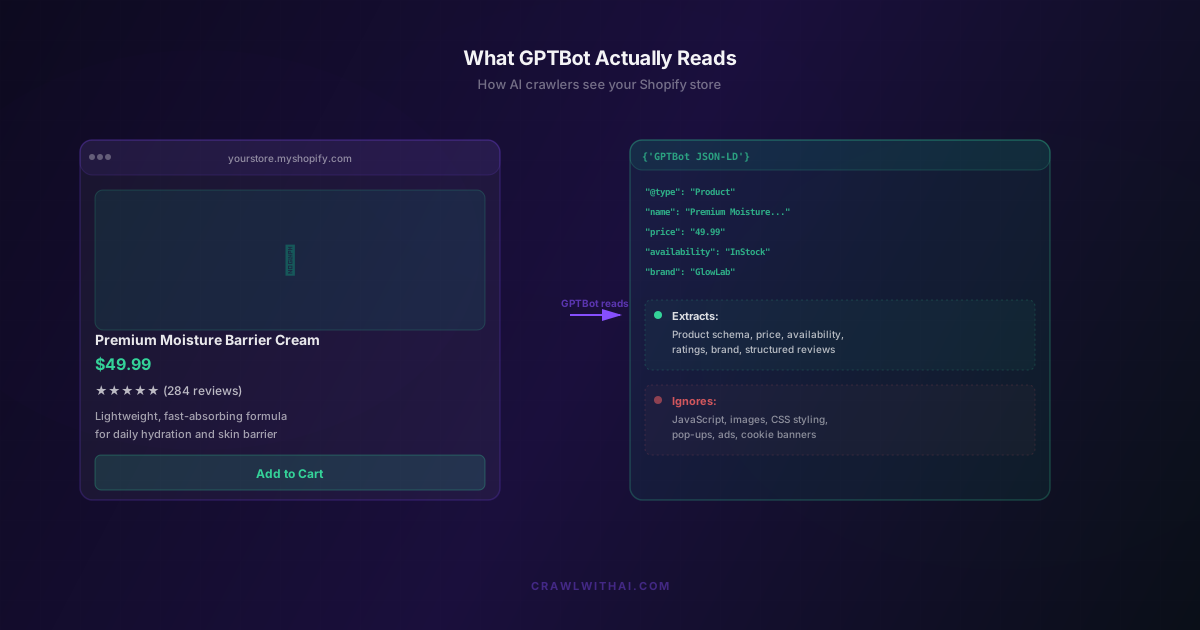
When a customer lands on your product page, they see a complete experience: images, styling, descriptions, reviews, pricing. When GPTBot visits the same page, it sees something radically different.
GPTBot is a headless crawler. It does not load JavaScript or render your design. It does not see the beautiful layout your theme provides. What it does is strip the page down to its structured components and extract any machine-readable data it can find.
A human sees: "Premium Moisture Barrier Cream, $49.99, 4.9 stars."
GPTBot sees (if you have proper markup):
"@type": "Product"
"name": "Premium Moisture Barrier Cream"
"price": "49.99"
"priceCurrency": "USD"
"availability": "InStock"
"aggregateRating": {
  "ratingValue": "4.9",
  "reviewCount": "284"
}
If you do not have that structured data, GPTBot sees something closer to raw HTML, and it has to guess. And when it guesses, it often gets it wrong or skips you entirely.
This is not a minor technical detail. It is the difference between being cited in ChatGPT recommendations and being completely invisible.
What GPTBot actually extracts from your store
GPTBot is looking for specific, machine-readable information. If you provide it cleanly, GPTBot finds you. If you do not, it moves on.
Here is what GPTBot actively searches for:
Product schema markup. This is the core signal. GPTBot looks for Product, Offer, and AggregateRating schema. These tags tell GPTBot what you are selling, at what price, whether it is in stock, and how it is rated. Without this markup, GPTBot cannot confidently recommend your product because it lacks the authoritative data it needs.
Organization schema. This tells GPTBot about your store itself. It includes your business name, contact information, address, social profiles, and brand identity. When GPTBot knows who is behind the store, it can weight recommendations more accurately.
Review aggregation. GPTBot pulls both the on-site reviews (if properly marked up) and looks for references to external review platforms. Stores with strong third-party review presence (Trustpilot, G2, etc.) signal authority. GPTBot treats third-party reviews as more credible than self-hosted ratings.
Breadcrumb hierarchy. This shows the path through your store: Home > Skincare > Moisturisers > Your Product. Breadcrumb markup helps GPTBot understand how your products fit into your store structure and category hierarchy.
Inventory status. GPTBot checks whether your product is in stock. Products marked as out of stock get deprioritised or ignored entirely in recommendations. If your inventory data is stale or inaccurate, you are invisible.
URL structure. GPTBot cares about clean, predictable URLs. A product at /products/premium-moisture-barrier-cream-50ml signals clarity. A URL like /product.php?id=284756&tag=sale&source=internal signals confusion.
The common thread here is clarity. GPTBot wants to extract clean, structured data about what you sell. The easier you make that extraction, the more reliable you appear in recommendations.
What GPTBot completely ignores
Understanding what GPTBot ignores is as important as knowing what it reads.
Images. GPTBot does not see your product photography. It does not care about how beautiful your images are or whether they use professional styling. This is not an image search engine. Alt text matters for SEO, but GPTBot is not evaluating your images.
JavaScript rendering. If your product details load via JavaScript, GPTBot does not wait for it to render. Headless crawlers like GPTBot can sometimes execute JavaScript, but OpenAI has configured GPTBot to be lean and fast. It prefers server-side HTML. If your price, description, or availability loads asynchronously, GPTBot might see an empty field.
CSS styling and design. The layout, colors, fonts, and overall aesthetic are invisible to GPTBot. A store with a $10,000 design and a store with a basic theme look identical to GPTBot if they have the same structured data.
Pop-ups, banners, and overlays. Email signup pop-ups, chat widgets, cookie consent banners, loyalty program prompts, these all get ignored. GPTBot sees past them.
Videos. GPTBot does not extract data from embedded videos. If critical product information (sizing, how to use, benefits) lives only in a video, GPTBot misses it. That information needs to be in text or structured data.
Dynamic content based on user behavior. If your store shows different content based on user location, device type, or referrer, GPTBot sees only the default version. Personalised experiences are invisible to crawlers.
The crawlers actually accessing your store right now
GPTBot is the main one because ChatGPT drives the most AI shopping traffic. But you should understand that other AI companies are crawling you too.
PerplexityBot crawls for Perplexity's Shopping Hub. It is more aggressive about live data and crawls more frequently than GPTBot. ClaudeBot crawls for Anthropic. GoogleBot-Extended crawls for Google's Gemini product recommendations. Each one has slightly different requirements and preferences.
According to Shopify's 2026 data, AI-referred traffic to retailers using their platform grew by 4,700% year over year by July 2025. That growth happened largely because these crawlers became active and started sending meaningful traffic. If your store is not optimised for what these crawlers can actually read, you are leaving a significant portion of that growth on the table.
The hidden blockers most Shopify stores do not know about
Many Shopify stores think they are crawler-friendly when they actually have blockers in place.
Robots.txt is blocking AI crawlers. Some stores, either intentionally or by accident, have configured their robots.txt to disallow GPTBot, PerplexityBot, or other AI crawlers. If your robots.txt includes a line like "Disallow: /products/*" or if you have blocked these agents entirely, no amount of structured data will help. GPTBot cannot access your store to extract anything.
Cloudflare settings are too restrictive. If you run your Shopify store behind Cloudflare with aggressive bot protection, you might be blocking AI crawlers. Some configurations flag all non-browser traffic as suspicious and return blank pages. GPTBot sees an empty page and moves on.
Schema markup is incomplete or conflicting. Many Shopify themes include basic schema out of the box, but it is often incomplete. Missing the price, missing the availability status, missing the rating count, all of these gaps make GPTBot less confident. Worse, some stores have conflicting schema markup (multiple Product entries, wrong price in one field, correct price in another). Conflicting data is worse than missing data because it signals unreliability.
Structured data is marked as "noindex". Some stores mistakenly use robots meta tags or noindex directives on their product pages, thinking this prevents Google from indexing thin content. But it also prevents GPTBot from reading the pages. If your product pages have noindex on them, AI crawlers will skip them.
Review data is not linked to structured data. You might have 500 reviews on your product page, but if they are not properly connected to your Product schema markup, GPTBot counts zero reviews. It sees the rating (if you show an aggregate) but not the review count or individual review data.
How to optimise for what GPTBot actually reads
The fixes here are technical, but most do not require a developer.
First, fix your robots.txt. Open your robots.txt file (usually at yourstore.com/robots.txt) and check for any lines that disallow AI crawlers. Remove blockers for GPTBot, PerplexityBot, and ClaudeBot. If you do not have a robots.txt, you do not need one. The default is to allow all crawlers.
Run your product pages through Google's Rich Results Test. Go to Google's Rich Results Test and enter a product page URL. It will show you exactly what structured data Google (and GPTBot) can extract. Fix any gaps or errors flagged.
Audit your schema markup completeness. For each product page, verify that your schema includes: product name, price, currency, availability, rating, review count, and images. If any of these are missing, update your product template.
Check Cloudflare settings if you use it. If you run your store through Cloudflare, check that bot protection is not set to block "unverified bot traffic" or you are not in Super Bot Fight mode at the most restrictive setting. Tone down the restrictions enough to allow AI crawlers through.
Link your reviews to schema markup. If you use an app like Judge.me or Stamped, make sure reviews are properly connected to your Product schema. The review count should appear in your structured data, not just visually on the page.
Rewrite product descriptions to include context, not just features. Remember that when GPTBot extracts your product description, it is looking for clarity about who this is for and what problem it solves. A description like "For dry skin types seeking lightweight hydration without greasiness, formulated with plant-based ingredients" will be weighted more heavily than "100% natural, fast-absorbing, lightweight."
How CrawlWithAI helps you optimise for what GPTBot reads
CrawlWithAI was built specifically to solve the gap between what humans see and what AI crawlers can actually read.
When you connect your Shopify store to CrawlWithAI, the platform does three things:
It crawls your store the way GPTBot does. CrawlWithAI mimics GPTBot's crawl behavior, extracting exactly what GPTBot would extract. This gives you a mirror image of what ChatGPT actually sees when it visits your store.
It audits and scores your AI readiness. The platform analyses your product pages, schema markup, inventory data, and crawler access, then produces a prioritised list of what to fix. You get a specific roadmap instead of guessing.
It monitors crawler health over time. After you make fixes, CrawlWithAI tracks whether crawlers can still access your store and whether your schema markup remains valid. It flags if your robots.txt changes, if new blockers appear, or if your markup breaks.
The result is that you do not have to understand GPTBot's architecture or manually audit every product page. CrawlWithAI does the technical analysis and tells you exactly what to fix, in order of impact.
What to do this week
Start small and focused:
-
Check your robots.txt. Open yourstore.myshopify.com/robots.txt and verify you are not blocking GPTBot, PerplexityBot, or ClaudeBot.
-
Run a product page through Google's Rich Results Test. Pick one of your best-selling products and see what structured data comes through. Note what is missing.
-
Check one product page for JavaScript loading. Open your browser's developer tools, go to the Network tab, and watch what loads. If your price or availability appears after "dynamic content" loads, GPTBot does not see it.
If you want a faster path, CrawlWithAI handles this analysis automatically and gives you a fix list you can work through with your developer or directly in Shopify (most fixes do not require code).
The gap between what humans see and what GPTBot reads is growing because more customers are discovering stores through AI recommendations. Optimising for what crawlers actually read is no longer optional.
Frequently Asked Questions
Does Shopify include enough schema markup by default?
Shopify themes include basic Product schema out of the box, but most leave review counts, breadcrumbs, or availability status incomplete. Check your product pages in Google's Rich Results Test to see what is missing. Many improvements require just updating your product template, not custom code.
If I block all bots in Cloudflare, will it block GPTBot?
Yes. If you have Cloudflare's Super Bot Fight Mode set to the most restrictive level, or if you have manually added specific bot rules, you could be blocking AI crawlers. Check your firewall rules to confirm GPTBot is allowed through.
How often does GPTBot crawl my store?
Frequency varies. Active stores with frequent updates might see GPTBot several times a week. Quieter stores might see it monthly. The crawl frequency is determined by OpenAI's infrastructure, but it is not something you can directly control. What you can control is making sure that when GPTBot arrives, your store is in the best shape possible.
Can I pay to get my products recommended by ChatGPT?
No. There is no payment model for ChatGPT recommendations. Like Google search, ChatGPT recommendations are organic. Your only leverage is making your store so clear and well-structured that GPTBot confidently extracts and cites you. There are no paid placements.
What if my schema markup is wrong? Will it hurt my Google ranking?
Wrong schema markup can occasionally trigger flags in Google Search Console, but it is more likely to simply be ignored. For GPTBot, incorrect schema is worse because it signals unreliability. Always validate schema markup with Google's Rich Results Test to catch errors before crawlers find them.