Your Shopify store might have the best products in your category. Your photography could be stunning. Your copy could be sharp. But if your Core Web Vitals scores are failing, Google is quietly pushing you down the results page. And in 2026, it is not just Google you need to worry about.
AI platforms like ChatGPT, Perplexity, and Gemini are crawling your store too. When their bots hit a page that takes four seconds to load, they move on. A slow store is an invisible store, in both traditional search and the new AI recommendation layer that is sending more traffic to e-commerce brands every month.
What Core Web Vitals actually measure
Google's Core Web Vitals are three specific metrics that measure real user experience on your site. They replaced the vague concept of "page speed" with precise, measurable thresholds.
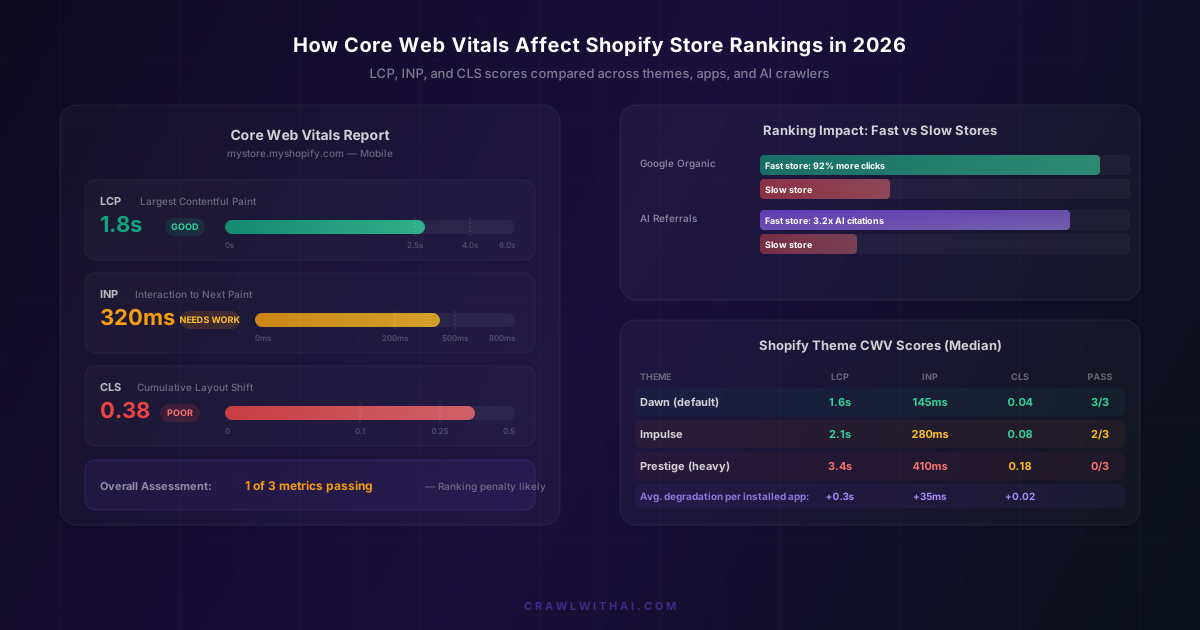
Largest Contentful Paint (LCP) measures how long it takes for the biggest visible element on your page to load. For most Shopify product pages, that is the hero image. Google wants this under 2.5 seconds. According to the Chrome UX Report from March 2026, only 41% of Shopify stores on mobile hit that target.
Interaction to Next Paint (INP) replaced First Input Delay in March 2024. It measures how quickly your page responds when someone taps a button, opens a dropdown, or interacts with any element. The threshold is 200 milliseconds. This is where most Shopify stores struggle, because third-party app scripts slow down interactivity significantly.
Cumulative Layout Shift (CLS) tracks visual stability. If your product images jump around while the page loads, if a banner pushes content down after the page appears to be ready, that is layout shift. Google wants this below 0.1. Injected app widgets and lazy-loaded review sections are the most common offenders on Shopify.
The ranking impact is measurable, not theoretical
There was a time when people debated whether Core Web Vitals actually affected rankings. That debate is over. Google's own Search Status Dashboard confirmed in January 2026 that page experience signals, including CWV, remain an active ranking factor. Sites that pass all three metrics in the field see measurably better performance.
A study published by Searchmetrics in late 2025 analysed 100,000 e-commerce URLs and found that pages passing all three Core Web Vitals had a 36% higher average position in Google results compared to pages failing two or more metrics. For competitive product queries, the gap was even wider.
Deloitte's research on mobile site speed found that a 0.1-second improvement in LCP correlated with an 8.4% increase in conversions for retail sites. That is not a rounding error. For a store doing $50,000 per month, improving LCP from 3.2 seconds to 2.4 seconds could mean thousands of dollars in additional monthly revenue just from the conversion rate lift.
Why Shopify stores specifically struggle with CWV
Shopify's infrastructure is solid. Their CDN is fast. Liquid rendering has gotten quicker over the years. So why do so many Shopify stores fail Core Web Vitals?
The answer is almost always the app ecosystem. The average Shopify store has 6 to 8 apps installed, according to Store Leads data from 2025. Each app injects JavaScript into your storefront. Review apps, upsell popups, loyalty widgets, chat bubbles, countdown timers. Every one of these adds render-blocking or layout-shifting code to your pages.
Theme choice matters too. Shopify's default Dawn theme was built from the ground up for performance and consistently passes all three CWV metrics. Heavier premium themes like Prestige or Symmetry can fail LCP on mobile right out of the box, before you have added a single app or customisation.
The third factor is images. Shopify automatically serves WebP images and provides responsive srcset attributes, but only if your theme supports them properly. Many stores upload uncompressed PNGs, skip alt text, and use hero images that are 4MB when they should be 200KB. Your beautiful lifestyle photography is killing your LCP.
How Core Web Vitals affect AI visibility (not just Google)
Here is where things get interesting for 2026. AI crawlers from OpenAI (GPTBot), Google (Googlebot, which also feeds Gemini), and others are hitting your pages regularly. These bots have crawl budgets and timeouts. If your page takes too long to respond or delivers content in a way that is hard to parse, the crawler may abandon the page or extract less information from it.
This matters because AI platforms use crawled content to build their recommendation knowledge. When ChatGPT recommends products in a category, it is drawing from what GPTBot successfully extracted from various stores. A store with fast, clean, well-structured pages gives the crawler more content to work with. A slow store with JavaScript-dependent rendering might give the crawler almost nothing.
There is no published research yet that directly correlates CWV scores with AI recommendation rates. But the logic is clear, and early data from CrawlWithAI users shows a strong pattern: stores that improve their CWV scores also tend to see increased AI-referred traffic within 4 to 8 weeks. The likely explanation is that faster pages give crawlers better access to your content, which leads to better representation in AI knowledge bases.
The three CWV fixes that matter most for Shopify
You could spend weeks optimising every detail. But for most Shopify stores, three changes deliver 80% of the improvement.
Fix your images. Use Shopify's built-in image optimisation. Make sure your theme uses the image_tag filter with proper width and height attributes. Set explicit dimensions on all product images to prevent CLS. Convert any remaining JPEG or PNG hero images to WebP. This alone can drop your LCP by 1 to 2 seconds on mobile.
Audit your apps ruthlessly. Install one app at a time and check your CWV scores after each. Tools like DebugBear or Google's own PageSpeed Insights give you field data from real Chrome users. If an app adds 200ms to your INP, ask yourself whether the revenue it generates justifies the ranking penalty. Often it does not. The loyalty popup converting at 0.3% is not worth the performance hit it inflicts on 100% of your visitors.
Switch to a performance-first theme if needed. If you are on a theme that fails CWV out of the box, no amount of optimisation will fix the underlying architecture. Dawn, Refresh, and Sense are Shopify's fastest free themes. If you need a premium theme, look for ones that explicitly publish their CWV benchmark scores.
How to measure your CWV scores correctly
A common mistake is testing your store with Lighthouse in Chrome DevTools and assuming those numbers reflect reality. Lighthouse gives you lab data, which is a simulated test on a throttled connection. It is useful for debugging, but it does not reflect what real users experience.
What Google actually uses for rankings is field data, collected from real Chrome users who visit your site. You can see this in Google Search Console under the Core Web Vitals report, or in the Chrome UX Report (CrUX) dataset. PageSpeed Insights shows both lab and field data side by side.
For Shopify stores, the field data often looks worse than lab data because real users are on slower phones and connections than your development machine. A store that scores 95 in Lighthouse on your MacBook might have failing LCP in the field because half your customers are on mid-range Android phones over 4G.
Test on mobile specifically. Google has used mobile-first indexing since 2021, which means your mobile CWV scores are what determine your ranking, even for desktop searches. If you are only checking desktop scores, you are looking at the wrong numbers.
How CrawlWithAI helps you connect CWV improvements to AI results
Improving your Core Web Vitals is smart for Google rankings and conversions. But how do you know whether those improvements are also helping your visibility in AI platforms?
CrawlWithAI tracks how AI platforms like ChatGPT, Perplexity, and Gemini recommend your products. After you fix your CWV issues, you can monitor whether your AI citation rate changes over the following weeks. This gives you a feedback loop that no other tool provides. You are not guessing whether better page performance translates to more AI recommendations. You are measuring it.
CrawlWithAI also tracks AI-referred revenue, so you can see the actual dollar impact of being recommended by AI assistants. When you combine CWV improvements with proper structured data markup and optimised product descriptions, the compound effect on AI visibility is significant.
The CWV benchmarks your Shopify store should target in 2026
Do not aim for "passing." Aim for comfortable margins above the thresholds, because your scores will fluctuate with traffic, seasonal app additions, and theme updates.
For LCP, target 2.0 seconds or less on mobile. The threshold is 2.5 seconds, but you want headroom. Every holiday season, stores add countdown timers and promotional banners that add latency. Build in a buffer.
For INP, target 150 milliseconds or less. The threshold is 200ms. Shopify's Liquid rendering is generally fast, but any JavaScript that runs on interaction (add-to-cart animations, variant selectors, quantity pickers) adds to your INP. Test every interactive element.
For CLS, target 0.05 or less. The threshold is 0.1. Reserve explicit space for any dynamically loaded content: review widgets, trust badges, recently viewed sections. Use CSS aspect-ratio or explicit width and height on all media elements.
If all three metrics are in the green across 75% of your page loads (the p75 threshold Google uses), you are in strong shape for both Google rankings and AI crawler access.
FAQ
Do Core Web Vitals affect Shopify rankings more than backlinks or content? No. Core Web Vitals are one signal among many. Google has said they are a tiebreaker when content quality and relevance are similar between competing pages. But in competitive product categories where dozens of stores sell similar items, CWV can be the factor that pushes you from position 8 to position 3.
Does Shopify's hosting automatically handle Core Web Vitals? Shopify's infrastructure handles server response time well. You will rarely have TTFB issues on Shopify. But LCP, INP, and CLS are front-end metrics affected by your theme, apps, images, and custom code. Shopify gives you a fast foundation, but what you build on top of it determines your scores.
How often should I check my Core Web Vitals? At minimum, check monthly in Google Search Console. Check after every app install or theme change. Set up monitoring with a tool like DebugBear or Treo to get alerts if your scores drop below thresholds.
Will improving CWV scores directly improve my AI recommendation rate? There is no confirmed direct ranking signal from CWV to AI recommendations. However, faster pages are more completely crawled by AI bots, which means more of your content ends up in AI knowledge bases. Stores with better CWV scores tend to have better AI visibility, and CrawlWithAI can help you track that correlation for your specific store.
Can too many Shopify apps ruin my Core Web Vitals? Yes. This is the single most common cause of failing CWV on Shopify. Each app that injects front-end JavaScript adds to your LCP and INP scores. Review apps, chat widgets, and popup tools are the worst offenders. Audit your apps quarterly and remove any that are not actively driving revenue.