Ask ChatGPT for the best product in your category. Then ask Perplexity. Then Google's AI Mode. If a competitor keeps showing up and your store never does, the reason is usually not your product, your price, or your reviews. It is one file most Shopify owners have never opened.
That file is your Shopify robots.txt. It is the first thing an AI crawler reads before it looks at a single product page, and it decides whether the crawler gets in at all. A few lines in the wrong place, often pasted in by a past developer or copied from a 2024 SEO guide, can tell GPTBot, PerplexityBot, and ClaudeBot to turn around at the door. No structured data, no clever product copy, and no amount of ad spend fixes a store the AI engines are not allowed to read.
What your Shopify robots.txt file actually controls
robots.txt is a plain text file that lives at yourstore.com/robots.txt. Each block names a crawler (the User-agent) and lists what it may or may not request (the Allow and Disallow rules). Googlebot has read this file for two decades. Now GPTBot, OAI-SearchBot, PerplexityBot, ClaudeBot, and a dozen others read it too.
On Shopify, robots.txt is generated automatically. Out of the box it blocks the paths that should be blocked (/admin, /cart, /checkout, /account, internal search) and allows everything else. Shopify does not let you upload a robots.txt file the way WordPress does. To change it, you edit a Liquid template called robots.txt.liquid, which we cover further down.
Here is the part that trips people up. robots.txt is an access gate, not a ranking signal. It does not make your products more appealing to an AI engine. It only decides whether the engine gets to see them. Miss this and everything downstream, your schema, your descriptions, your reviews, becomes invisible. If you want the full picture of what a crawler does once it is inside, we broke that down in what GPTBot actually reads when it crawls your store.
Does Shopify block AI bots by default? The honest answer
There is a popular claim going around that Shopify secretly blocks AI crawlers on every store. That is mostly a myth, and getting it right matters.
Shopify's default robots.txt does not block GPTBot, ClaudeBot, PerplexityBot, OAI-SearchBot, or any other major AI search bot. The only default Disallow rules cover admin, cart, checkout, and search paths. Craftshift, a Shopify partner agency, confirmed this in a May 2026 audit, and feed specialists at GoDataFeed and Sobefy report the same. If your store blocks AI bots, a person added those rules.
There is one real wrinkle. In late 2025 Shopify added language to store robots files aimed at automated "buy for me" agents, the kind that try to complete a checkout with no human review step. That is a limit on agentic checkout, not a wall around your catalog. Your product and collection pages stay crawlable by the answer engines unless something else is blocking them. So the panic headline is wrong, but the instinct behind it, go check your file, is exactly right. Most blocks are self-inflicted.
The three kinds of AI bots you are deciding about
Before you touch a single rule, understand that "AI bot" is not one thing. The major vendors now run three separate bots, and blocking the wrong one costs you customers.
Training bots crawl to feed model training. GPTBot and ClaudeBot are the examples. Blocking these stops your content from training the next model. For a product catalog the training value is low, so the block is mostly symbolic.
Search-index bots build the live index the assistant searches when a shopper asks "find me a waterproof duffel under $120." OAI-SearchBot, Claude-SearchBot, and PerplexityBot sit here. Block these and you disappear from AI search results. Do not block them.
User-fetch bots fire when a specific shopper asks the assistant to open your page in real time. ChatGPT-User, Claude-User, and Perplexity-User do this. Blocking them breaks the most commercial moment there is, a buyer trying to reach your store through an assistant. Do not block them either.
The old advice to "block all AI" treated these as one switch. They are not. You can block training and still keep every dollar of search and user-fetch traffic.
The five Shopify robots.txt settings that quietly block AI crawlers
Here are the rules that actually do the damage, in rough order of how often they show up.
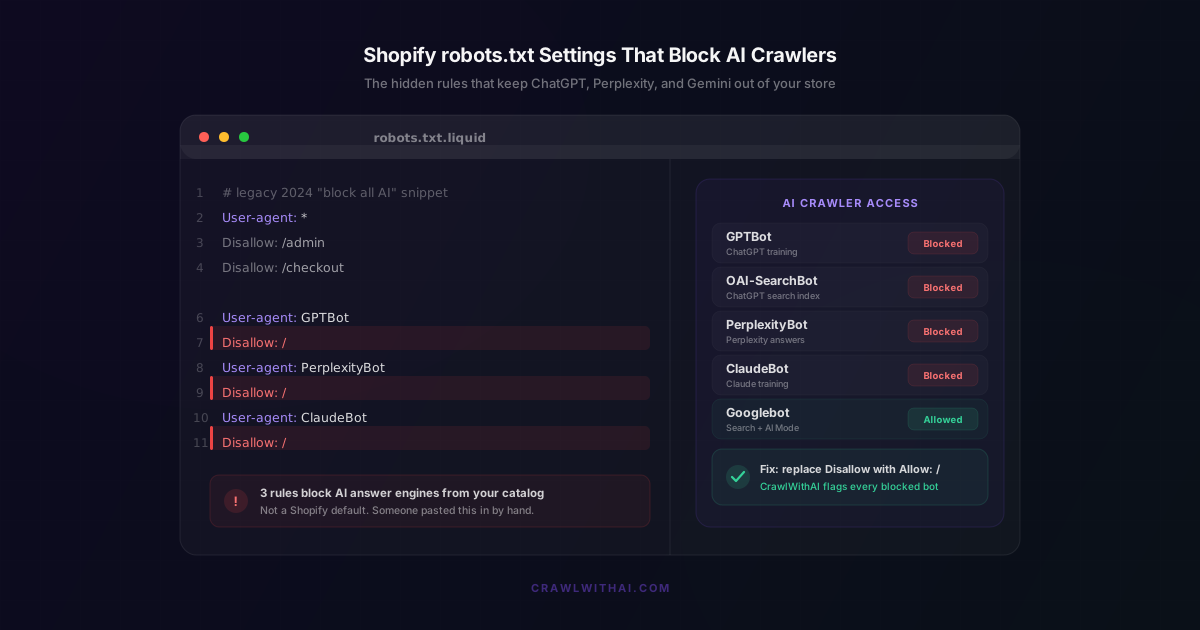
The legacy "block all AI" snippet. In 2023 and 2024, dozens of SEO posts told everyone to paste a block list into robots.txt to keep AI from scraping their content. Publishers had a reason. Stores copied it anyway. If your robots.txt.liquid contains User-agent: GPTBot followed by Disallow: /, that is the snippet, and it is now costing you referrals.
The wildcard trap. A rule like User-agent: * followed by a broad Disallow hits every bot, AI engines included. Some stores tried to consolidate to canonical URLs and accidentally walled off the whole catalog.
Disallowing /products/ or /collections/. This one is brutal. It blocks bots from the exact pages the AI engines need to recommend you. We have seen it applied on purpose, to hide pages someone thought were thin, with no idea it also erased the store from AI answers.
noindex on collection pages. This is a meta tag, not a robots.txt rule, but the effect is the same. AI bots respect noindex. If your category pages carry a noindex directive, they will not appear in AI search, and category pages are where a lot of "best X for Y" queries land.
Aggressive Cloudflare or bot protection. If your store sits behind Cloudflare with Super Bot Fight Mode at its strictest, or a firewall rule that flags all non-browser traffic, AI crawlers get served a blank page or a challenge and leave. Your robots.txt can say "come in" while your edge settings slam the door.
How to check whether your store is blocking AI crawlers
You can audit this in about ten minutes.
Read your file first. Open yourstore.com/robots.txt in a private browser tab. Search for any User-agent line naming GPTBot, OAI-SearchBot, ClaudeBot, Claude-SearchBot, PerplexityBot, or Google-Extended followed by Disallow: /. Any of those is a block.
Check your paths. Confirm you are not disallowing /products/ or /collections/ under User-agent: *.
Test with the assistant itself. Ask ChatGPT in browse mode to visit your homepage and describe your brand. If it cannot fetch the page, something is blocking it.
Check the edge. If you use Cloudflare, look at your bot fight settings and your firewall event log for blocked requests from AI user-agents.
Watch your analytics. In GA4, look for referral traffic from chatgpt.com, perplexity.ai, or gemini.google.com. Zero referrals from a store with steady traffic can be a sign the bots never got in.
How to edit your Shopify robots.txt the right way
Because Shopify generates robots.txt, you change it through a template, not a file upload. The steps are short:
- In your Shopify admin, go to Online Store, then Themes. On your live theme, open the three dot menu and choose Edit code.
- Under Templates, click Add a new template, pick robots, file type liquid. Shopify creates robots.txt.liquid with its default rules.
- If a legacy block exists, find each
User-agent: GPTBot(or ClaudeBot, PerplexityBot, and so on) paired withDisallow: /and delete those blocks. Keep the default rules that protect admin, cart, and checkout. - To be explicit, append allow rules for the bots you want, keeping Shopify's defaults intact:
User-agent: OAI-SearchBot
Allow: /

User-agent: ChatGPT-User
Allow: /

User-agent: PerplexityBot
Allow: /

User-agent: Claude-SearchBot
Allow: /
- Save. The change is live in seconds. Re-fetch yourstore.com/robots.txt to confirm the block is gone.
If you have never customized robots.txt, no template exists yet, Shopify is serving its default, and the major AI bots are already allowed. In that case the fix is usually somewhere else, your Cloudflare settings or a stray noindex tag, not the file itself. Shopify documents the robots.txt.liquid process in its help center if you want the official reference.
The traffic you lose while the door stays shut
This is not a rounding error anymore. Adobe Analytics found that traffic to US retail sites from generative AI sources jumped roughly 1,200% in a single year. Over the 2025 holiday season, AI-referred revenue per visit was up 254% while AI referrals converted about 31% better than other sources. Those shoppers arrive pre-sold by the assistant.
Meanwhile the web is splitting into stores that let the bots in and stores that do not. Cloudflare reports that more than 2.5 million sites had chosen to fully disallow AI training crawlers by August 2025, and over a million of its customers had switched on AI-crawler blocking. GPTBot is the single most-blocked AI crawler, appearing in about 5.52% of all robots.txt Disallow rules in early 2026 according to an analysis of Cloudflare's network. Every store that blocks removes itself from the answer. Stay open while your category blocks itself, and that is a gift.
How CrawlWithAI keeps your store readable
The hard part is not fixing one rule. It is knowing a rule broke in the first place. Theme updates regenerate templates. A new app rewrites your robots file. You will not notice, because nothing on your storefront looks different. The only symptom is a slow leak of AI referrals you never see.
CrawlWithAI watches that door for you. It crawls your store the way GPTBot, PerplexityBot, and the other answer engines do, then tells you exactly which bots can get in and which are blocked, down to the specific line in your robots.txt. If a theme change or a new rule closes access, you get an alert instead of a mystery. It also ties access to revenue, so you can see the orders that came from AI recommendations and understand what a block would actually cost you.
You do not need to memorize thirty user-agent strings or audit your robots file by hand every week. The point is simple: get the bots in first, because none of your other AI optimization work counts until they can reach your pages.
Frequently asked questions
Does Shopify block AI crawlers by default?
No. Shopify's default robots.txt allows GPTBot, PerplexityBot, ClaudeBot, and the major AI search bots. It only blocks admin, cart, checkout, and internal search paths. If your store blocks AI crawlers, someone added those rules by hand in robots.txt.liquid.
Will allowing AI bots hurt my Google ranking?
No. AI crawlers and Googlebot are separate systems that do not interact. Allowing GPTBot or PerplexityBot has no effect on your standard Google search position, and for a typical store their traffic is a small fraction of Googlebot's.
Should I block GPTBot?
For most stores, no. GPTBot is the training crawler. Blocking it stops model training but does nothing for or against your ChatGPT search visibility, which runs through OAI-SearchBot and ChatGPT-User. Unless you hold a specific position on AI training, allow all three OpenAI bots.
How do I edit robots.txt on Shopify?
You cannot upload a file. Go to Online Store, Themes, Edit code, and add a robots.txt.liquid template. Keep Shopify's default protections for admin and checkout, then save. The change goes live immediately.
How long until I show up in AI search after fixing this?
Usually one to four weeks. ChatGPT search and Perplexity refresh faster than Google's AI Mode. You will see referral traffic from chatgpt.com and perplexity.ai build gradually in your analytics as the indexes update.
Sources
- Cloudflare, From Googlebot to GPTBot: who's crawling your site in 2025
- Adobe Analytics, Traffic to U.S. Retail Websites from Generative AI Sources Jumps 1,200 Percent
- Adobe Business, The explosive rise of generative AI referral traffic
- Craftshift, Stop blocking AI bots in your Shopify robots.txt (2026 update)
- Shopify Help Center, Editing robots.txt.liquid
- Technology Checker, We Analyzed robots.txt Across Cloudflare's Network