Your Shopify store gets plenty of traffic. Your ads are working. Your SEO is solid. But your revenue numbers tell a different story. The gap between sessions and sales keeps growing, and the problem is almost certainly sitting in your pocket right now.
Mobile devices account for 73% of all e-commerce traffic globally, according to Statista's 2025 Mobile Commerce Report. But here is the painful part: mobile conversion rates average just 2.2%, compared to 4.1% on desktop, per Contentsquare's 2025 Digital Experience Benchmarks. That means more than half your potential mobile revenue disappears before anyone clicks "Add to Cart." The fix is not about getting more traffic. It is about stopping the bleed on the traffic you already have.
The Mobile Traffic Gap That Drains Revenue
The numbers paint a clear picture. Wolfgang Digital's 2025 E-Commerce KPI Report found that while mobile generates 65% of e-commerce sessions, it produces only 41% of revenue. That is a 24-percentage-point gap between traffic share and revenue share.
For a Shopify store doing $50,000 per month, closing even half that gap could mean an extra $8,000 to $12,000 in monthly revenue. No extra ad spend. No new traffic sources. Just fixing what is already broken.
The problem is not that mobile shoppers do not want to buy. They do. Google's internal research shows that 59% of shoppers say the ability to shop on mobile influences which brand or retailer they buy from. The intent is there. Your mobile product pages just make it too hard to act on that intent.
Popups and Interstitials Kill the First Impression
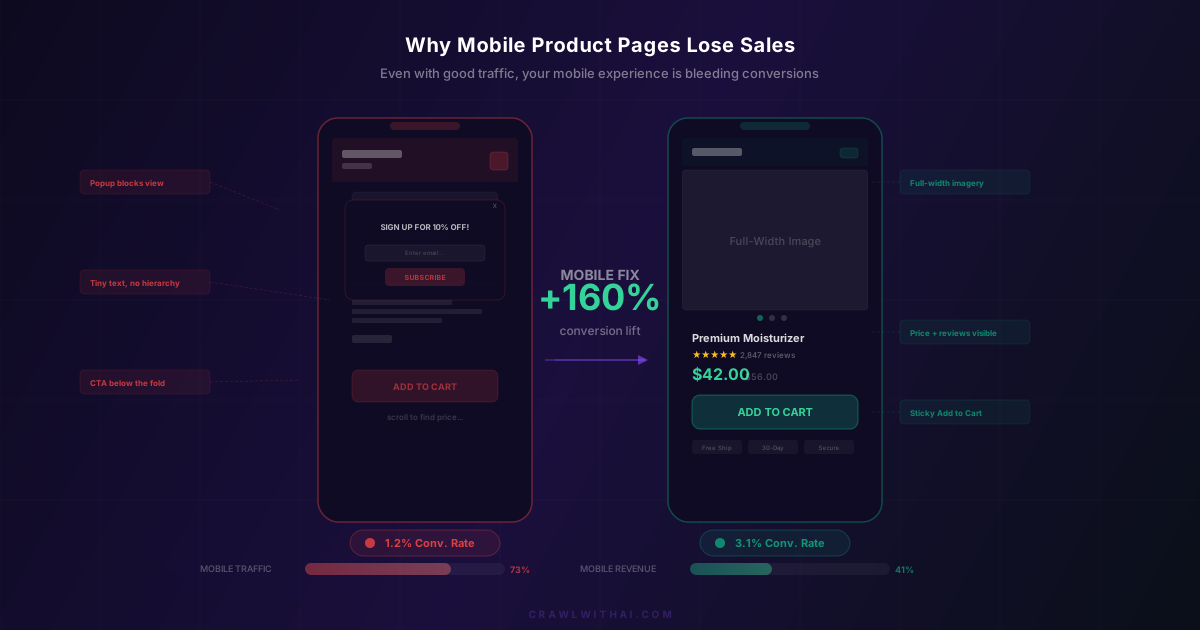
Nothing destroys a mobile shopping session faster than a full-screen popup appearing two seconds after someone lands on your product page. On a 6-inch screen, that "Sign up for 10% off!" overlay covers the entire viewport. The tiny X button becomes a precision challenge that most thumbs fail.
Google has been penalising intrusive mobile interstitials since 2017, and they tightened the rules again in their March 2025 core update. But the conversion impact goes beyond SEO penalties. A Sumo study found that the average popup conversion rate is just 3.09%. That means 96.91% of the people who see your popup get annoyed for nothing.
If you must use popups on mobile, delay them by at least 30 seconds, make them half-screen at most, and ensure the close button is at least 44x44 pixels. Better yet, use a non-intrusive slide-up bar at the bottom of the screen.
Product Images That Do Not Fill the Screen
Desktop product pages can get away with smaller images surrounded by text and sidebar widgets. Mobile pages cannot. On a phone screen, the product image is the single most important element above the fold.
Baymard Institute's mobile UX research, based on testing across 133 e-commerce sites, found that 56% of mobile users attempt to pinch-to-zoom on product images within the first few seconds. If your images are low resolution, do not support zoom, or are cropped awkwardly on mobile, you lose trust immediately.
The fix is straightforward. Use full-width product images with a 1:1 or 4:5 aspect ratio. Support swipe gestures for multiple images. Enable pinch-to-zoom with high-resolution source files (at least 2000px on the longest side). And for apparel or home goods, include at least one lifestyle image showing the product in context. Shopify's Dawn theme handles this well out of the box, but many third-party themes still shrink images into small containers with excessive padding.
Price and CTA Buried Below the Fold
Here is a common scenario on poorly optimised mobile product pages: a shopper lands from an AI recommendation or a Google search, sees a product image, then has to scroll through a product title, variant selectors, a long description, shipping info, and trust badges before they ever see the price or the "Add to Cart" button.
On desktop, all of this fits on one screen. On mobile, it takes 3 to 4 scroll depths. Every scroll is a chance for the shopper to lose interest or get distracted.
The highest-converting mobile product pages follow a specific hierarchy above the fold: product image, product title, star rating, price, and a sticky "Add to Cart" button. According to the Baymard Institute, sticky add-to-cart buttons on mobile increase conversion rates by an average of 8% compared to static buttons that scroll with the page. Some Shopify themes include this feature natively. For others, apps like Sticky Add to Cart by Starter or custom Liquid code can add it.
Slow Load Times on Mobile Networks
Your product page might load in 1.5 seconds on your office Wi-Fi. But your customers are browsing on 4G connections at lunch, on spotty Wi-Fi in coffee shops, or on crowded networks during commutes. Real-world mobile load times are almost always worse than what you see in your own testing.
Google's research shows that 53% of mobile visitors abandon a page that takes longer than 3 seconds to load. For every additional second of load time, conversion rates drop by an average of 4.42%, according to Portent's 2024 Site Speed Study.
For Shopify stores, the biggest mobile speed killers are unoptimised images (use Shopify's built-in image CDN and lazy loading), too many third-party scripts (audit every app's impact on load time), render-blocking JavaScript from review widgets and chat tools, and custom fonts loading synchronously instead of using font-display: swap.
Run your product pages through Google PageSpeed Insights with "Mobile" selected. If your Largest Contentful Paint is above 2.5 seconds or your Cumulative Layout Shift is above 0.1, you have work to do. Check out our guide on the Shopify store speed checklist for specific fixes.
Touch Targets and Thumb-Friendly Design
Mobile is a touch-first interface, but many Shopify stores design their product pages as if shoppers are using a mouse. Small variant selectors, tiny quantity buttons, and cramped navigation menus all create friction that desktop users never experience.
Google's Material Design guidelines recommend a minimum touch target size of 48x48 CSS pixels, with at least 8 pixels of spacing between targets. Apple's Human Interface Guidelines set the minimum at 44x44 points. Many Shopify themes fail both standards, especially on variant selectors and filter dropdowns on collection pages.
Audit your product pages by trying to use them with just your thumb on the largest phone screen you have. Can you easily select every variant? Can you tap "Add to Cart" without accidentally hitting something else? Can you navigate back to the collection without reaching for the top-left corner? If any answer is no, you are losing sales from frustrated mobile shoppers.
Mobile Checkout Friction Compounds the Problem
Even if your product pages are perfect, a clunky mobile checkout will undo all that work. Shopify's native checkout is reasonably well optimised for mobile, but customisations and third-party integrations can break the experience.
The Baymard Institute's checkout usability research found that the average e-commerce checkout abandonment rate is 70.19%. On mobile, it is even higher. The top reasons include being forced to create an account (cited by 26% of users), a too-complicated checkout process (22%), and concerns about payment security (18%).
Shopify stores should enable Shop Pay, Apple Pay, and Google Pay for one-tap purchasing. These accelerated checkout options bypass the entire form-filling process that mobile users hate. Shopify's own data shows that Shop Pay converts 1.72x better than standard checkout on mobile. Make sure these options appear on your product page, not just at checkout.
How CrawlWithAI Connects Mobile Performance to AI Visibility
Here is something most store owners miss: mobile page quality does not just affect human shoppers. It also affects whether AI platforms recommend your products.
When ChatGPT, Perplexity, or Gemini evaluate your store for product recommendations, they look at signals that correlate with mobile experience, including page speed, structured data quality, content clarity, and user engagement metrics. A slow, cluttered mobile product page sends negative signals across all these dimensions.
CrawlWithAI helps Shopify stores get recommended by AI shopping assistants and tracks the revenue those recommendations drive. Part of that process involves ensuring your product pages are structured and performant enough for both AI crawlers and human shoppers. When your mobile product pages load fast, present information clearly, and convert well, AI platforms pick up on those quality signals. The result is more AI recommendations and higher conversion rates from every traffic source, not just AI.
If you have already optimised your Shopify product descriptions and structured data, mobile product page performance is the next piece of the puzzle.
FAQ
What is a good mobile conversion rate for Shopify stores? The industry average is around 2.2%, but top-performing Shopify stores achieve 3% to 4% on mobile. If you are below 1.5%, your mobile product pages likely have significant UX issues. Start by benchmarking against Contentsquare's annual Digital Experience Benchmarks for your specific product category.
Should I use a different layout for mobile and desktop product pages? Yes. Responsive design should not mean shrinking your desktop page to fit a phone screen. Mobile product pages need a different content hierarchy, with sticky CTAs, full-width images, and condensed information architecture. Many Shopify themes offer mobile-specific layout options in the theme editor.
How do I test my mobile product page performance? Use three tools together. Google PageSpeed Insights for technical performance metrics, Google's Mobile-Friendly Test for layout issues, and real-device testing on both iOS and Android. Chrome DevTools device emulation is useful for quick checks, but it does not replicate real network conditions or touch interactions accurately.
Does mobile page speed affect AI product recommendations? Indirectly, yes. AI platforms evaluate overall site quality when deciding which products to recommend. Page speed is a component of that quality assessment. A slow mobile experience correlates with lower engagement metrics, which can reduce the likelihood of AI recommendation. Our post on Core Web Vitals and Shopify rankings covers the technical details.
What Shopify apps help improve mobile product page conversion? Look at apps that add sticky add-to-cart buttons, optimise images automatically, and enable accelerated checkout. Be selective, though. Every app adds JavaScript to your page, which can slow down mobile load times. The irony of installing five "conversion optimisation" apps that collectively add 2 seconds to your page load is lost on nobody.
Sources
- Statista, "Mobile E-Commerce Traffic Share Worldwide 2025": https://www.statista.com/statistics/277125/share-of-website-traffic-coming-from-mobile-devices/
- Contentsquare, "2025 Digital Experience Benchmarks": https://contentsquare.com/insights/digital-experience-benchmarks/
- Wolfgang Digital, "2025 E-Commerce KPI Report": https://www.wolfgangdigital.com/kpi-study/
- Baymard Institute, "Mobile E-Commerce UX": https://baymard.com/research/mobile-commerce-usability
- Google, "Mobile Page Speed Benchmarks": https://www.thinkwithgoogle.com/marketing-strategies/app-and-mobile/mobile-page-speed-new-industry-benchmarks/
- Portent, "Site Speed and Conversion Rate Study": https://www.portent.com/blog/analytics/research-site-speed-hurting-everyones-revenue.htm
- Baymard Institute, "Checkout Usability": https://baymard.com/lists/cart-abandonment-rate