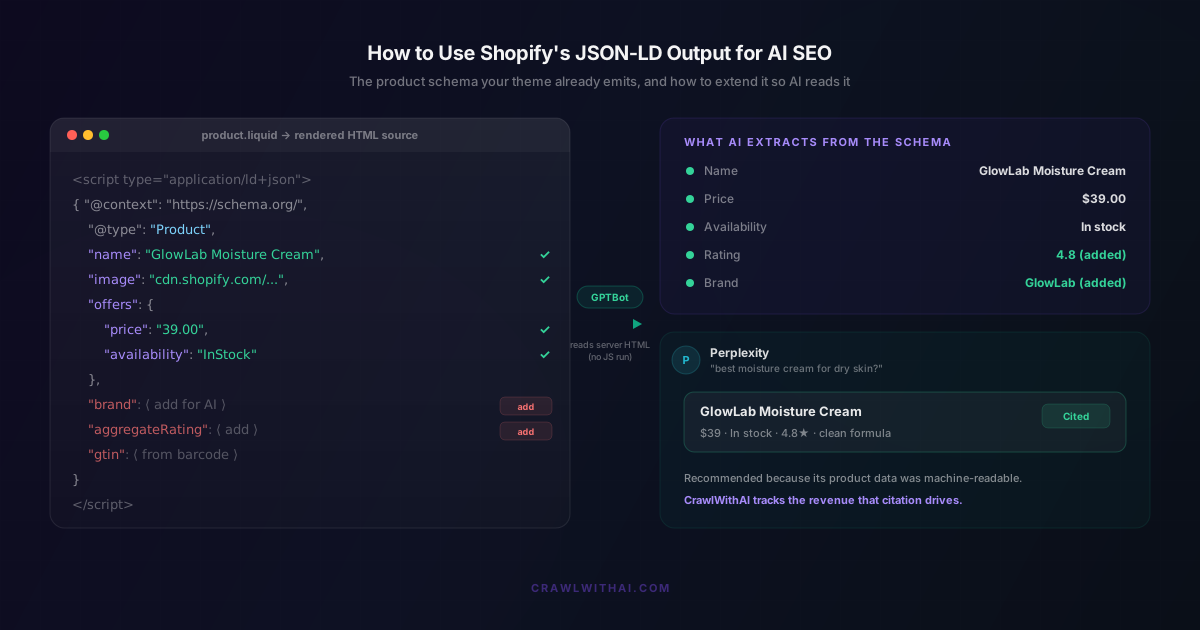
Your Shopify store is already sending JSON-LD to every AI crawler that visits. Most owners have never looked at it. That is a problem, because the Shopify JSON-LD your theme emits is the single cleanest signal ChatGPT, Perplexity, and Gemini use to decide what you sell, what it costs, and whether it is worth recommending.
The good news is you do not start from zero. Shopify themes ship with a structured data filter that writes a Product schema block into your page for free. The catch is that the default output stops at the basics, and the basics are no longer enough to get cited. This post shows you exactly what Shopify emits, how to read it, where it falls short for AI, and how to extend it without becoming a schema expert.
What Shopify's JSON-LD Output Actually Is
JSON-LD is a small block of machine-readable data that sits in a script tag in your page's HTML. It describes your product in a vocabulary from Schema.org that search engines and AI systems agree on. Instead of hoping a crawler guesses your price from your page layout, you hand it the number directly.
Shopify generates this for you. Modern themes use a Liquid filter, {{ product | structured_data }}, which prints a <script type="application/ld+json"> block containing a Product object. In Shopify's reference theme Dawn, you will find this inside the main product section. Older and custom themes often hardcode the same JSON-LD in a snippet like structured-data.liquid or directly in the product template.
The default block covers the commercial core: product name, description, image, SKU, and an Offer for each variant carrying price, price currency, and availability. When you fill in a product's Barcode field, Shopify also adds the GTIN. That is a real head start. It is also where Shopify stops.
How to See the JSON-LD Your Store Is Already Emitting
You cannot fix what you have not read. Open any product page, right click, and choose View Page Source. Use Ctrl+F or Cmd+F to find application/ld+json. The JSON block that appears is exactly what a crawler downloads.
Two checks matter here. First, run the same URL through Google's Rich Results Test and the Schema.org Markup Validator. These flag syntax errors and missing required fields. Second, and this is the step most guides skip, confirm the JSON-LD is in the raw HTML rather than injected later by a script. The fastest way is to fetch the page the way a bot does, with a plain curl request, and search the response for your schema. If your price and rating only appear after JavaScript runs, most AI crawlers will never see them. More on why that matters next.
Why AI Crawlers Depend on JSON-LD More Than Google Does
Googlebot renders your page. It runs a headless Chrome engine, executes your JavaScript, waits for content to load, then indexes the result. AI crawlers do not do this. They request the URL, read whatever HTML the server returns, and move on.
This is not a theory. An analysis of more than 500 million GPTBot requests found no evidence the crawler ever executed JavaScript. GPTBot downloads JavaScript files about 11.5% of the time and never runs them. As of mid 2026, none of the major AI crawlers render JavaScript, including GPTBot, OAI-SearchBot, ChatGPT-User, PerplexityBot, ClaudeBot, and Bytespider. Whatever is not in your server-rendered HTML is invisible to them.
This is the quiet advantage of Shopify's JSON-LD. It is written in Liquid on the server, so it lands in the raw HTML every crawler downloads. A review app that injects rating schema through JavaScript in the browser produces markup Google can see and ChatGPT cannot. Same store, same product, two different realities depending on who is reading.
The reason to care is where the traffic is going. Adobe Analytics reported that visits to US retail sites from generative AI sources jumped 1,200% year over year in early 2025, then reached 4,700% by that July. In an Adobe survey of 5,000 shoppers, 38% said they had already used generative AI to shop and 52% planned to. Being readable to these crawlers is no longer optional. If you want the mechanics of what the crawler parses, we covered it in What GPTBot Actually Reads When It Crawls Your Shopify Store.
Where Shopify's Default JSON-LD Falls Short for AI
Shopify's default schema answers "what is this and what does it cost." AI recommendations need more than that. When Perplexity suggests a product, it almost always names the brand, quotes a rating, and mentions the return terms. Those are the exact fields Shopify leaves out.
The common gaps are brand, aggregateRating and Review, shippingDetails, and hasMerchantReturnPolicy. Each missing field is a claim the AI cannot make on your behalf. Without aggregateRating, your 4.8 average from 312 reviews does not exist as far as a crawler is concerned. Without a return policy in the schema, you drop out of answers to "which brand has free returns." The product is fine. The description of the product is incomplete.
This gap is wider than it looks across the web. According to W3Techs data from December 2025, only 25.1% of all websites use JSON-LD at all, and 46.3% use no structured data of any kind. Most stores are either silent or half-speaking to the machines deciding their visibility. Filling the fields Shopify skips is one of the highest-return fixes available.
How to Extend Shopify's JSON-LD Output for AI SEO
You extend the schema in the same place Shopify writes it: your theme. Open the product section or the structured-data snippet, find the JSON-LD block, and add the fields that are missing. Brand is often a single line pulling product.vendor. A return policy and shipping details can be static objects that reflect your real terms.
Ratings are the field worth the most effort. If you use a review app, check whether it exposes aggregate values through Liquid objects or metafields. If it does, render those numbers into the server-side JSON-LD instead of relying on the app's browser-injected widget. That single change moves your rating from invisible to citable.
For everything that does not fit a standard Shopify field, use metafields and metaobjects as your data store, then print them into the schema. Material, care instructions, ingredient lists, warranty length. This is the same structured foundation that helps crawlers understand your catalogue, which we go deeper on in How Shopify Metafields Improve AI Crawler Understanding of Your Products. The rule of thumb is simple. If a shopper would ask about it, put it in the schema in words a machine can parse. Google itself recommends JSON-LD as the format to do this in, because it is the easiest to maintain at scale and it sits apart from your page layout.
The Mistakes That Make Your JSON-LD Worse Than Nothing
Broken schema is worse than no schema, because it teaches AI engines to distrust your markup. Three mistakes cause most of the damage.
The first is stale availability. If your JSON-LD says InStock while the product is sold out, crawlers that catch the mismatch learn to discount everything else you claim. Your schema has to match your real inventory at all times, which means it should be generated from live Shopify data, not typed by hand and left to drift.
The second is duplicate and conflicting blocks. A theme emits Product schema, then a review app injects its own Product block with a different structure. Now the page has two answers to the same question and the crawler has to pick. Audit your source for more than one application/ld+json Product block and consolidate to a single clean version.
The third is trusting client-side rendering. This is the one that quietly kills AI visibility. If a headless or heavily customised build only assembles product data in the browser, your beautiful schema never reaches a crawler that does not run scripts. Server-rendered JSON-LD is the fix, and it is exactly what standard Shopify themes already give you.
How CrawlWithAI Closes the JSON-LD Gap
Reading your own JSON-LD, spotting the gaps, and keeping it accurate across a full catalogue is real work. CrawlWithAI does it from the crawler's point of view rather than the SEO checklist's.
Instead of only validating your schema against Google's minimum, it looks at what GPTBot, PerplexityBot, and other AI crawlers actually pull from your store's server-rendered HTML. It flags the products where brand, rating, or return data is missing, catches availability that has drifted out of sync, and finds the schema that lives only in JavaScript where no AI crawler will read it. Then it ranks the fixes by likely revenue impact, so you work on the products that can win recommendations first.
Passing Google's Rich Results Test tells you your markup is valid. It does not tell you whether an AI engine has enough to confidently recommend you. CrawlWithAI closes that second gap, and then tracks the orders that AI citations actually drive, so the work shows up as revenue rather than a guess.
Measuring Whether Your JSON-LD Is Working
Changes here show up faster than most SEO work. Once crawlers refetch your pages, watch three things. Track the share of your catalogue with valid, complete schema and push it toward 100%. Watch rich result impressions in Google Search Console, which usually move within a week. Then watch AI referral traffic in your analytics, looking for sessions from chatgpt.com, perplexity.ai, and gemini.google.com, which tends to shift over two to four weeks as engines refresh what they know about you.
The compounding is the reason to start now. Complete JSON-LD earns more citations, more citations give AI engines more data about your products, and that makes the next recommendation more confident. Clean schema pays off long after you deploy it.
FAQ
Does Shopify create JSON-LD automatically?
Yes, but only the basics. Modern themes use the {{ product | structured_data }} filter to emit a Product block with name, description, image, SKU, price, currency, and availability, plus GTIN when you fill the Barcode field. Brand, ratings, shipping, and return policy are usually missing and need to be added in your theme.
Where is the JSON-LD in my Shopify theme?
Look in the main product section or a snippet named something like structured-data.liquid. You are searching for a <script type="application/ld+json"> block or a line that calls the structured_data filter. To see the final result, use View Page Source on a live product page and search for application/ld+json.
Why does JSON-LD matter more for AI than for Google? Google renders JavaScript and can read data your scripts build in the browser. AI crawlers like GPTBot and PerplexityBot do not run JavaScript, so they only see server-rendered HTML. Shopify's JSON-LD is written on the server, which is why it reaches AI crawlers when browser-injected markup does not.
Will adding more JSON-LD fields improve my rankings? It improves how completely AI engines can describe and cite you, which is the goal for AI SEO. Accuracy matters more than volume. Correct brand, rating, and return data helps. Inflated or mismatched data erodes trust and can trigger Google manual actions, so only claim what is true.
How do I know if my rating schema is server-side?
Fetch the product URL with a plain request that does not run scripts, such as curl, and search the response for aggregateRating. If it is there, AI crawlers can read it. If it only appears in the browser after your review app loads, it is client-side and most AI crawlers will miss it.
Sources
- Adobe Analytics, Generative AI Traffic to US Retail Sites: https://blog.adobe.com/en/publish/2025/03/17/adobe-analytics-traffic-to-us-retail-websites-from-generative-ai-sources-jumps-1200-percent
- Adobe, Generative AI-Powered Shopping Rises with Traffic to Retail Sites: https://business.adobe.com/blog/generative-ai-powered-shopping-rises-with-traffic-to-retail-sites
- W3Techs, Usage Statistics of JSON-LD for Websites: https://w3techs.com/technologies/details/da-jsonld
- JavaScript Rendering and AI Crawlers Analysis: https://www.getpassionfruit.com/blog/javascript-rendering-and-ai-crawlers-can-llms-read-your-spa
- Google Search Central, Intro to Structured Data Markup: https://developers.google.com/search/docs/appearance/structured-data/intro-structured-data
- Shopify, Ecommerce Schema Structured Data Guide: https://www.shopify.com/blog/ecommerce-schema