Open your GA4 acquisition report and look at the Direct channel. For most Shopify stores it has been creeping up for a year, and the obvious explanation, more people typing your domain from memory, does not hold. What actually grew was AI. ChatGPT, Perplexity and Gemini are sending you buyers, and GA4 is filing a large share of them under Direct, the one bucket that means "we have no idea where this came from."
Here is the uncomfortable part. Out of the box, GA4 will not sort this out for you. Setting up AI traffic attribution in Google Analytics 4 is something you have to do by hand, and even after you do it there is a hard ceiling on what GA4 can see. This post walks the exact setup, step by step, and stays honest about the gap no configuration can close.
What Google Analytics 4 Does With AI Traffic By Default
GA4 sorts every session into a channel using two signals: any UTM parameters on the link, and the referrer header the browser sends. AI traffic usually arrives with neither set the way GA4 expects.
When a link from ChatGPT or Claude does carry a referrer, GA4 reads the domain, fails to recognise it as a search engine or a known source, and drops it into Referral. That sounds fine until you look inside Referral. It is a junk drawer. Your AI traffic sits next to email-client redirects, link shorteners, payment gateways and referral spam. You cannot tell what AI drove a sale without digging through source names by hand.
When the referrer is missing, which is the common case, GA4 has nothing to read, so the session defaults to Direct. Direct is supposed to mean a visitor who typed your URL or used a bookmark. Now it is full of AI buyers who clicked a recommendation. We covered the wider version of this confusion in organic search traffic versus AI-referred traffic. The short version: by default, GA4 either buries AI in Referral or loses it in Direct.
The New AI Assistant Channel, And What It Misses
Google did respond. On 13 May 2026 it added an AI Assistant channel to the GA4 Default Channel Group. Qualifying sessions get tagged with a medium of ai-assistant and grouped on their own, with no setup required. The launch named ChatGPT, Gemini and Claude. By June 2026 the live Default Channel Group documentation lists five sources: ChatGPT, Gemini, Deepseek, Copilot and Grok.
Turn it on in your reports and it helps. Then read the limits, because they decide everything.
It only classifies a session if the referrer survived the trip. The no-referrer sessions that default to Direct stay in Direct. It is not retroactive, since GA4 processes data daily and does not re-bucket history, so every session before mid-May 2026 keeps its old label. Perplexity is not in the channel and still lands in Referral, which stings because Perplexity is one of the highest-intent shopping sources. And Google's own AI Overviews count as Organic Search, so the AI answers sitting on top of search results look like ordinary Google clicks. Google built a better label. It can only attach that label to the minority of AI sessions that arrive with their source intact.
Step One: Build a Custom Channel Group for AI Traffic in GA4
The native channel is a floor, not a finish. The real workhorse is a custom channel group, and it fixes two of the native channel's problems at once.
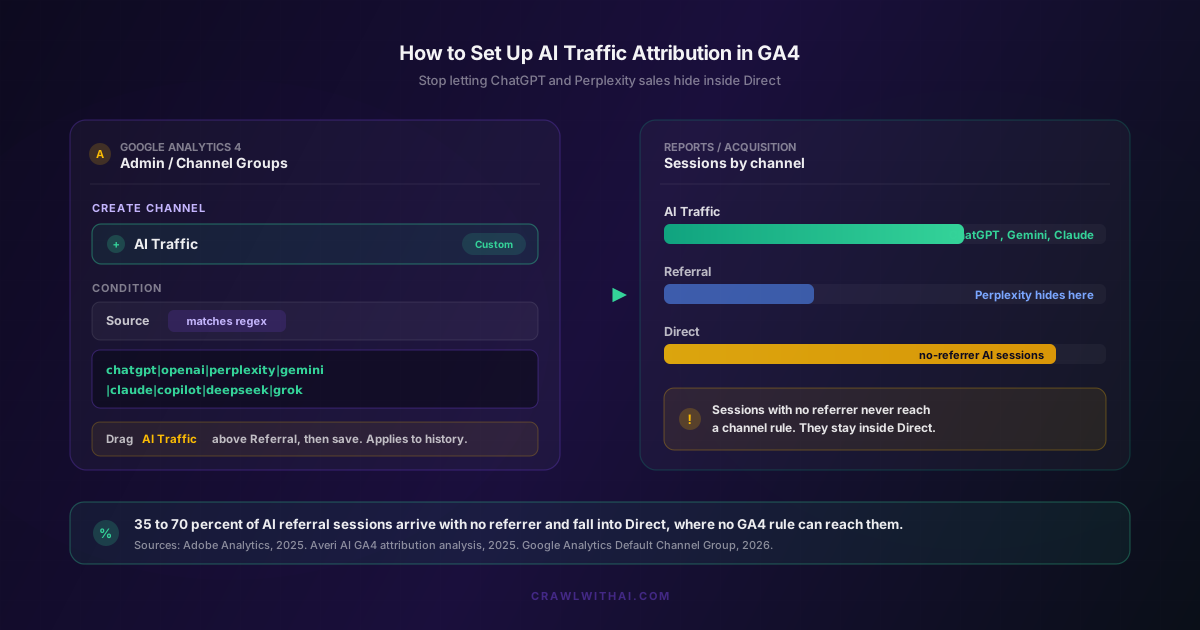
In GA4, go to Admin, then Data Display, then Channel Groups. Create a new channel group, or edit a copy of the default one. Add a new channel and name it AI Traffic. You are going to give it a rule that catches every AI platform you care about, including the ones Google ignores.
The advantage that makes this worth your afternoon: a custom channel group applies to your whole history. GA4 re-buckets your existing source and medium data the moment you save, so you can see AI traffic going back as far as your data goes, not just from the day you set it up. That is the opposite of the native channel, and it means you can chart the real trend instead of starting from zero.
Step Two: The Regex That Catches the Platforms Google Misses
Inside your new AI Traffic channel, set the condition to Source matches regex, then paste a pattern that covers the major assistants. A practical starting pattern looks like this:
chatgpt|chat\.openai|openai|perplexity|gemini\.google|bard\.google|claude\.ai|copilot|bing\.com\/chat|deepseek|grok|mistral
Google's own Analytics team published guidance in August 2025 on this exact approach, naming ChatGPT, Gemini, Copilot, Claude and Perplexity as platforms to capture with regex. Add new domains as platforms launch, because they will.
Two details decide whether this works. First, after you create the AI Traffic channel, drag it above Referral in the channel order. GA4 assigns each session to the first matching rule, so if Referral sits higher, it grabs your AI sessions before your new rule ever runs. Second, match on the source, not the medium, since most AI referrers come through as a plain domain with no medium attached.
Once it is live, the difference shows up immediately. Perplexity sessions pull out of Referral. ChatGPT sessions that predate the native channel reappear in your history. You finally have one row in your report that means "AI sent this."
Step Three: Tag the Links You Actually Own
A custom channel group catches traffic that arrives with a readable source. You can widen that pool by tagging every link you control with UTM parameters, so any link you post to social, your newsletter, or a partner site arrives clearly labelled and never falls into the junk drawer.
The catch is that this only works for links you own. When an AI recommends you, it generates the link itself and usually surfaces your clean root domain, sanding off any campaign tags before the shopper ever sees them. We went deep on this in why UTM parameters break when traffic comes from ChatGPT. The takeaway for your GA4 setup is simple: tag what you own, and do not expect UTM tags to rescue the AI traffic you do not own.
The Gap No GA4 Setup Can Close
Here is the honest limit. Every method above, the native channel, the custom regex, the UTM tags, depends on the session arriving with something to read. A referrer, or a tag. The single biggest slice of AI traffic arrives with neither.
The numbers are not small. An analysis by Averi AI of just under 450,000 AI-adjacent visits found that 70.6% arrived with no referrer and landed in GA4 as Direct, and other studies put the no-referrer share between 35% and 70% depending on device mix. The reasons are structural. AI apps open links in in-app browsers that drop the referrer. Many AI links carry rel="noreferrer". And a lot of people copy the URL out of an answer and paste it into a fresh tab. No regex can match a field that is empty.
This would be a footnote if AI traffic were a rounding error. It is not. Adobe Analytics reported that referral traffic to US retail sites from generative AI platforms rose 693% year over year across the November and December 2025 holiday season, with retail up 769% in November alone. That came after an earlier 1,200% jump between July 2024 and February 2025. A separate Visibility Labs study tracked ChatGPT sessions growing 1,079% across 94 ecommerce brands in a single year, and found AI-referred traffic converting 31% higher than non-branded organic search, because the AI did the comparison shopping before the customer arrived. So the channel growing fastest and converting best is the one most likely to land in the Direct bucket your rules cannot touch. This is the same blind spot behind why last-click attribution misses your AI revenue.
How CrawlWithAI Closes the Attribution Gap
CrawlWithAI works the problem from the other side of the conversation. Instead of waiting for a session to land in GA4 and trying to reverse-engineer a source from a referrer that was already deleted, it watches when ChatGPT, Perplexity, Gemini and other assistants mention and recommend your store. It tracks which of those mentions drive clicks, then ties that activity back to the orders in your Shopify store.
The shift is in timing. Identification happens at the moment the AI references you, not at the moment a browser fails to hand over a referrer. So the sessions that vanish into Direct under any GA4 setup still get counted, because the signal comes from the AI side, not the browser side. You keep your GA4 channel group for the traffic GA4 can see, and you add a revenue layer for the AI-influenced orders it cannot. If you are also rebuilding your models, our post on how multi-touch attribution handles AI referrals shows where this layer fits. A model can only credit what it can see, and GA4 alone cannot see most AI traffic.
FAQ
How do I track ChatGPT and Perplexity traffic in GA4? Build a custom channel group under Admin, Data Display, Channel Groups. Create a channel called AI Traffic with the condition Source matches regex, paste a pattern covering chatgpt, openai, perplexity, gemini, claude, copilot and grok, then drag it above Referral. This catches Perplexity, which the native AI Assistant channel still files under Referral.
Does GA4 track AI traffic automatically now? Partly. Since 13 May 2026, GA4 has a native AI Assistant channel that recognises ChatGPT, Gemini, Deepseek, Copilot and Grok with no setup. It only works for sessions that arrive with a referrer, it is not retroactive, and it excludes Perplexity and Google AI Overviews, so a custom channel group is still worth building.
Why is my ChatGPT traffic showing up as Direct?
Because the session has no referrer and no UTM tag for GA4 to read. AI apps open links in in-app browsers that strip the referrer, many AI links use rel="noreferrer", and people often paste the URL into a new tab. With nothing to read, GA4 defaults the session to Direct.
Will a custom channel group fix my historical AI data? Yes, for the sessions that carried a source. Custom channel groups apply retroactively, so GA4 re-buckets your existing data the moment you save. Sessions that originally arrived with no referrer stay in Direct, because there is no source for the rule to match.
How much AI revenue does GA4 miss? It depends on your device and platform mix, but with 35% to 70% of AI sessions arriving without a referrer, a store that relies only on GA4 can undercount AI-influenced orders by half or more. Tracking from the AI side of the conversation, rather than the browser side, is the only way to close that gap.
Sources
- Adobe Analytics, Generative AI-Powered Shopping Rises with Traffic to U.S. Retail Sites: https://business.adobe.com/blog/generative-ai-powered-shopping-rises-with-traffic-to-retail-sites
- Digital Commerce 360, Generative AI shifts online holiday shopping traffic in 2025 (693% YoY): https://www.digitalcommerce360.com/2026/01/13/generative-ai-online-holiday-shopping-traffic-2025/
- Adobe Analytics, Traffic to US Retail Websites from Generative AI Sources Jumps 1,200 Percent (March 2025): https://blog.adobe.com/en/publish/2025/03/17/adobe-analytics-traffic-to-us-retail-websites-from-generative-ai-sources-jumps-1200-percent
- Averi AI, Attribution for AI-Referred Traffic: Fixing the Direct Traffic Problem in GA4: https://www.averi.ai/blog/attribution-for-ai-referred-traffic-ga4-direct-traffic
- Search Engine Journal, Google Analytics Adds AI Assistant As Default Channel Group: https://www.searchenginejournal.com/google-analytics-adds-ai-assistant-as-default-channel-group/574974/
- ALM Corp, ChatGPT Traffic Converts 31% Higher Than Non-Branded Organic Search (2025 Data Analysis): https://almcorp.com/blog/chatgpt-vs-organic-search-conversion-rate/