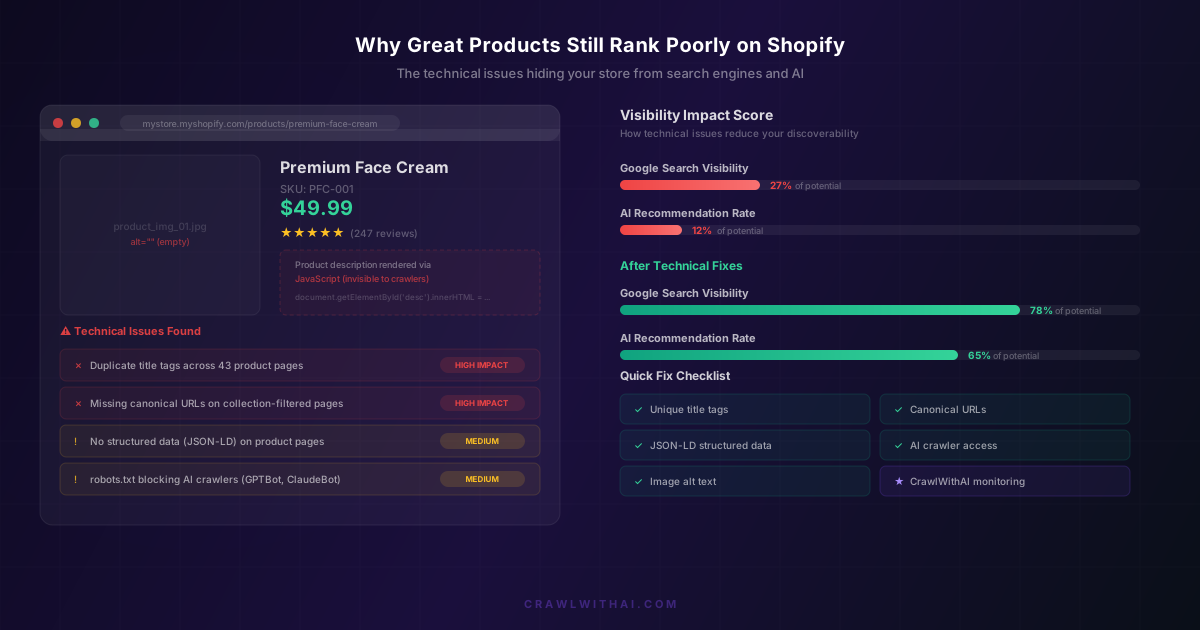
You have a great product. Five-star reviews, repeat customers, margins that make sense. But when someone searches for what you sell, your store is nowhere. Not on page one of Google. Not in ChatGPT's recommendations. Not in Perplexity's shopping answers.
The problem isn't your product. It's the technical foundation underneath your Shopify store. And most store owners never look there because everything looks fine from the front end.
The Invisible Wall Between Your Products and Search Engines
Search engines and AI crawlers don't see your store the way your customers do. They see raw HTML, structured data (or the lack of it), and server responses. When technical issues exist, crawlers either misunderstand your pages or skip them entirely.
A 2025 Ahrefs study found that 68% of all web pages get zero organic traffic from Google. For Shopify stores specifically, Screaming Frog's annual crawl data showed that 42% of Shopify product pages had at least one critical technical issue that prevented proper indexing. That's nearly half of all product pages, sitting there looking beautiful to humans but invisible to machines.
The gap is even wider for AI. Google has decades of experience parsing messy HTML. AI crawlers like GPTBot and ClaudeBot are newer, less forgiving, and more reliant on clean structure. If your technical SEO is shaky for Google, it's probably broken for AI.
Duplicate Title Tags: The Most Common Shopify Killer
Shopify's default theme behaviour generates title tags from your product name. That sounds fine until you realize how many stores have products with similar names, or worse, use the same template title across pages.
When Google encounters 40 product pages all titled "Premium Skincare | MyStore," it has no idea which one to rank for any given query. So it picks none of them. Or it picks the wrong one.
Semrush's 2025 site audit data across 10,000 Shopify stores revealed that 37% had duplicate title tags on more than 20% of their pages. These stores averaged 62% less organic traffic than stores with unique titles across all pages.
The fix is simple but tedious. Every product page needs a unique, descriptive title that includes the primary keyword someone would actually search for. "Vitamin C Brightening Serum for Oily Skin" beats "Brightening Serum | MyStore" every time.
Canonical URL Confusion From Collection Filtering
This one is sneaky. Shopify creates multiple URLs for the same product depending on how a customer arrives at it. If someone clicks through your "Best Sellers" collection, the URL becomes /collections/best-sellers/products/your-product. If they come through "New Arrivals," it's a different URL. The product page is identical, but search engines see multiple pages competing with each other.
Shopify does add canonical tags by default, but many themes override or break this behaviour. Custom collection filtering apps make it worse by generating even more URL variants without proper canonicalization.
Google's John Mueller has said repeatedly that canonical confusion is one of the top reasons e-commerce pages underperform. When your own pages compete against each other, everyone loses.
Check your store by appending ?variant= parameters and collection paths. If those pages don't point back to a single canonical URL, you're splitting your ranking signals across dozens of duplicates.
JavaScript-Rendered Content That Crawlers Never See
Modern Shopify themes love JavaScript. Tabs that reveal product details on click. Accordion FAQs that expand. Reviews loaded asynchronously. Product descriptions injected via JavaScript after page load.
Here's the issue: Google renders JavaScript, but not always, and not immediately. GoogleBot has a render queue, and JavaScript-heavy pages sit in that queue for days or weeks before being fully processed. During that time, Google only sees the static HTML, which might be nearly empty.
AI crawlers are even more limited. GPTBot and ClaudeBot primarily read static HTML. If your product description only exists inside a JavaScript bundle, these crawlers see a product page with no description at all. They literally cannot recommend what they cannot read.
Lumar's 2025 rendering study found that 29% of Shopify stores had critical content hidden behind JavaScript that wasn't present in the initial HTML response. Product descriptions, specifications, and FAQ content were the most commonly affected.
The solution: make sure your core product information exists in the initial HTML. Use JavaScript to enhance the presentation, not to deliver the content itself.
Missing or Broken Structured Data
Structured data markup tells search engines exactly what your page contains. Price, availability, reviews, brand, product category. Without it, search engines have to guess. And they guess wrong more often than you'd think.
Shopify's default themes include basic JSON-LD for products, but many themes strip it out or implement it incorrectly. Third-party apps that modify product pages frequently break the structured data without any visible error on the front end.
Google's Rich Results report shows the impact clearly: pages with valid Product structured data earn rich snippets (price, rating, availability shown directly in search results), which drive 35% higher click-through rates according to Search Engine Journal's 2025 CTR study.
For AI recommendations, structured data is even more critical. AI systems use structured data as a primary signal for understanding what you sell, what it costs, and whether it's available. A product page without structured data is just a wall of text that AI has to interpret, and it often interprets it incorrectly or ignores it entirely.
Robots.txt Blocking AI Crawlers
This is the technical issue most Shopify store owners don't even know exists. Your robots.txt file controls which crawlers can access your site. Many Shopify stores either use the default robots.txt (which doesn't explicitly allow AI crawlers) or have added rules that accidentally block them.
OpenAI's GPTBot, Anthropic's ClaudeBot, Google's Extended bot for AI features, and PerplexityBot all respect robots.txt. If your file blocks them, they simply won't crawl your store. Your products will never appear in AI recommendations, no matter how good they are.
A 2025 analysis by Originality.ai found that 26% of Shopify stores were blocking at least one major AI crawler. Most store owners had no idea. They'd either copied a robots.txt template from a blog post about blocking "bad bots" or had an SEO plugin that added restrictive rules by default.
Check your robots.txt at yourstore.com/robots.txt. Look for Disallow rules that might catch AI user agents. If you want to appear in AI recommendations, you need to explicitly allow these crawlers access.
Slow Server Response Times and Render Delays
Page speed matters for rankings, but the specific metric that kills Shopify stores is Time to First Byte (TTFB). This is how long the server takes to start sending the page content. It's different from how fast the page loads visually.
Shopify's shared infrastructure means your TTFB depends partly on server load. But the bigger factor is usually the theme. Themes with heavy Liquid template logic, excessive app scripts, and large unoptimized images push TTFB well beyond the 200ms threshold that Google considers fast.
Google's Core Web Vitals data from the Chrome UX Report shows that stores with TTFB under 200ms rank, on average, 2.3 positions higher than stores with TTFB over 800ms for the same keywords. That's the difference between page one and page two.
For AI crawlers, slow response times mean they simply crawl fewer of your pages. Crawl budgets are real for every bot. If your pages take 3 seconds to respond, a crawler that planned to index 500 pages might only get through 150 before moving on.
Image Alt Text: The SEO Signal Everyone Skips
Image alt text isn't just an accessibility requirement. It's a ranking signal for Google Image search and a content signal for AI crawlers that can't interpret images.
Yet most Shopify stores either leave alt text empty (the default when uploading) or fill it with the filename ("IMG_4523.jpg"). Every blank alt attribute is a missed opportunity to tell search engines and AI what your product looks like, what it does, and who it's for.
Write alt text that describes the product specifically: "Matte black ceramic pour-over coffee dripper on marble countertop" tells crawlers far more than "coffee dripper" or nothing at all. This text becomes part of what AI systems use to understand and recommend your products.
How CrawlWithAI Finds and Fixes These Technical Issues
Technical SEO problems are invisible from the front end of your store. You need a tool that sees your site the way crawlers see it. CrawlWithAI scans your Shopify store from the perspective of both search engines and AI crawlers, identifying the exact technical issues that are suppressing your visibility.
It checks for duplicate titles, broken canonicals, JavaScript-rendered content, missing structured data, robots.txt misconfigurations, and slow response times. More importantly, it monitors your AI visibility over time, tracking whether ChatGPT, Perplexity, and Gemini are actually recommending your products and what revenue those recommendations drive.
The difference between a technically sound store and one with hidden issues isn't cosmetic. It's the difference between showing up when customers ask AI for recommendations and being completely invisible.
FAQ
Why does my Shopify store look fine but rank poorly?
Technical SEO issues are invisible to visitors. Problems like duplicate title tags, missing canonical URLs, and JavaScript-rendered content affect how search engines and AI crawlers interpret your pages, not how they appear in a browser. Your store can look perfect while being nearly invisible to the systems that drive discovery.
Can Shopify apps cause technical SEO problems?
Yes. Apps that inject scripts, modify product pages, or add custom filters frequently break structured data, create duplicate URLs, or add JavaScript dependencies that hide content from crawlers. Each app you install should be checked for its impact on your page source, not just its visible output.
How do I check if AI crawlers can see my product pages?
View your page source (right-click, View Source) and search for your product description text. If it's not there, it's being loaded via JavaScript and AI crawlers can't see it. Also check your robots.txt file for any rules blocking GPTBot, ClaudeBot, or PerplexityBot.
Do these technical issues affect AI recommendations more than Google rankings?
Generally, yes. Google has sophisticated rendering infrastructure and years of experience with messy HTML. AI crawlers are newer, rely more heavily on clean HTML and structured data, and have smaller crawl budgets. A technical issue that causes a minor Google ranking drop might completely prevent AI recommendation.
How quickly do rankings improve after fixing technical issues?
Google typically reflects technical improvements within 2 to 6 weeks as pages are recrawled and reindexed. AI recommendation changes can happen faster since AI platforms recrawl frequently, but the full impact usually takes 4 to 8 weeks to stabilize.
Sources
- Ahrefs 2025 Search Traffic Study: https://ahrefs.com/blog/search-traffic-study/
- Screaming Frog Annual Shopify Crawl Report 2025: https://www.screamingfrog.co.uk/shopify-seo/
- Semrush Site Audit Data 2025: https://www.semrush.com/blog/site-audit-issues/
- Lumar JavaScript Rendering Study 2025: https://www.lumar.io/learn/seo/javascript-seo/
- Search Engine Journal CTR Study 2025: https://www.searchenginejournal.com/google-first-page-clicks/
- Originality.ai AI Crawler Blocking Analysis: https://originality.ai/blog/ai-bot-blocking
- Google Core Web Vitals, Chrome UX Report: https://developers.google.com/web/tools/chrome-user-experience-report