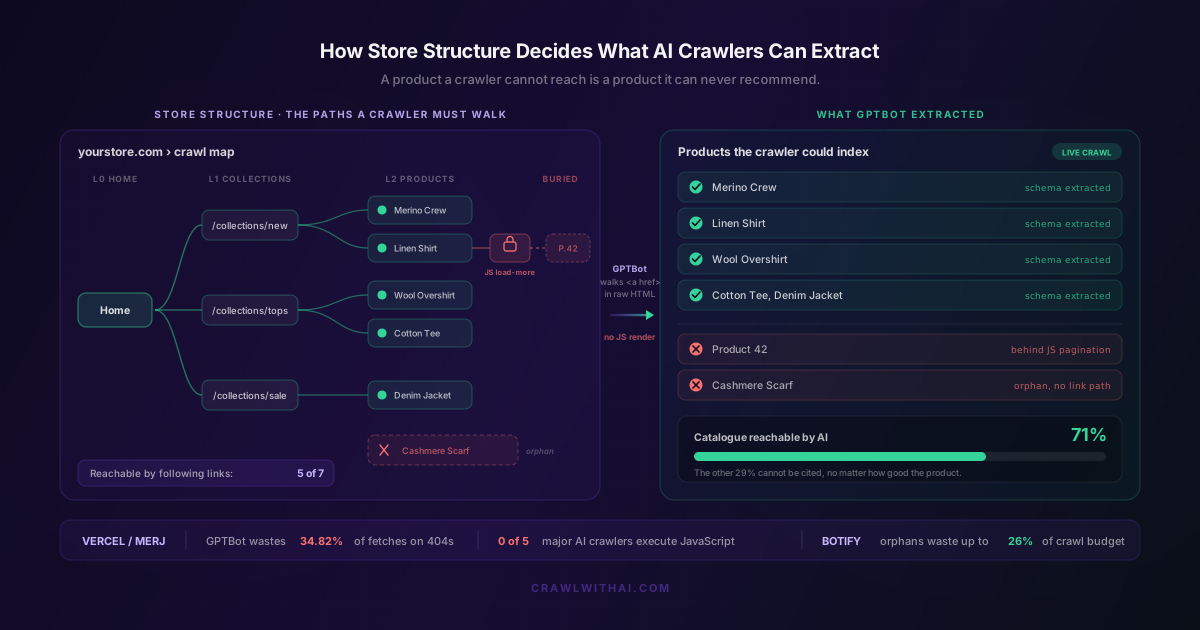
A shopper opens ChatGPT and asks for a machine washable wool overshirt under 200 dollars. You sell exactly that. It sits on your store right now, on page three of a collection, behind a "Load more" button that only fires when JavaScript runs. GPTBot does not run JavaScript. It read page one, found no link onward, and moved on. The sale went to a competitor whose catalogue sits two clicks from the homepage.
That competitor did not write better copy. Their Shopify store structure was simply easier to crawl. AI crawlers do not browse the way people do. They follow links in the raw HTML you serve, they skip anything that needs a browser to appear, and they abandon a startling share of the pages they attempt. Whatever your structure exposes in plain HTML is the full set of products an AI can ever recommend. Everything else is invisible, however good it is.
Your Shopify store structure is the map AI crawlers actually follow
Start with how these crawlers move. GPTBot, ClaudeBot and PerplexityBot download a page's HTML, read the links inside, queue them, fetch the next page, and repeat. That is the whole mechanism. There is no memory of your admin and no sense of your brand, only the graph of links they can reach from where they already are.
The catch is what they cannot do. In a network study of over 500 million GPTBot fetches, Vercel and MERJ found that none of the major AI crawlers render JavaScript. GPTBot, Claude and PerplexityBot all download JavaScript files without ever executing them. So a navigation menu, a product grid, or a "Load more" control that only appears once a browser runs the script is not a slow path for these crawlers. It is a wall. We went deeper on this in why Shopify themes affect your AI visibility, and it is the fact that reframes structure as a crawl problem rather than a design one.
If a product is not linked, in server-rendered HTML, from a page the crawler already reached, that product does not exist to the crawler. Your store structure is not decoration around the catalogue. It is the catalogue, as far as an AI is concerned.
What structure means to a crawler: depth, links and URLs
Three things decide whether a product gets reached: how many links deep it sits, whether those links are real, and whether the URLs behind them are stable.
Depth is the number of clicks from the homepage. Level zero is home, level one is a collection linked from it, level two is a product linked from that collection. Botify's crawl research is blunt about what happens next: page depth has an outsized effect on how often a page is crawled, and shallower pages get visited far more than deep ones. A product four or five links down competes for scraps. A product two links down gets seen on almost every visit.
Shopify's defaults help: out of the box you get a clean two to three level tree of homepage, /collections/ and /products/, with predictable URLs. The trouble starts when stores pile navigation, filters and pagination on top in ways that bury products or hide the links entirely.
AI crawlers run out of patience faster than Google
Every crawler has a budget: a certain number of URLs it will fetch on a given visit and no more. Spend it on real product pages and you get indexed. Spend it on dead ends and you do not.
Here is where AI crawlers are genuinely worse than Google, and the same Vercel and MERJ data proves it. GPTBot spent 34.82 percent of its fetches on 404 pages, and another 14.36 percent following redirects. Googlebot, by comparison, wasted only 8.22 percent of its fetches on 404s and 1.49 percent on redirects. So a third of an AI crawler's effort already evaporates on URLs that lead nowhere, before it reaches a single product you care about.
That changes the maths on housekeeping. Broken internal links, redirect chains and a stale sitemap.xml cost you more with AI crawlers than with Google, because they have less budget to spare and burn more of it on junk. Every dead URL your theme or apps leave lying around is a fetch that could have reached a product page instead.
Orphan products are invisible products
An orphan is a product with no incoming link from anywhere a crawler can reach. It exists in your admin and it has a URL, but nothing points to it. On Shopify this happens more than people expect: a product removed from a collection but left active, or a variant split into its own product that never got added to navigation.
Botify's analysis of enterprise sites found orphan pages consume 26 percent of crawl budget on average, and as the share of orphans grows, the crawl ratio of your real pages drops. That figure is measured on Google, the more efficient crawler. On an AI crawler that already misfires a third of the time, an orphan-heavy catalogue compounds the problem: the orphan is rarely found, and it drags attention away from the products that are properly linked.
The fix is a rule, not a project. Every product you want recommended needs at least one link from a page the crawler can already reach. In practice that means it belongs in a live collection, and that collection is reachable from your main navigation in server-rendered HTML.
Where your Shopify store structure quietly works against you
A handful of common Shopify patterns look fine to shoppers and break silently for crawlers.
JavaScript mega-menus are the first. If your main navigation is built by a script that runs in the browser, the crawler downloads the page and sees a menu with no links in it. Your entire collection tree can vanish this way. View the page source, not the rendered page, and check that your nav links are really in the HTML.
Infinite scroll and "Load more" pagination are the second. If products beyond the first page only load when JavaScript fires, everything past page one is unreachable. The safe pattern is numbered pagination that uses real links, such as ?page=2, that a crawler can follow without a browser.
Faceted filters are the third, and they cut the other way. Every filter combination Shopify generates, colour, size, price, in stock, can spawn a crawlable URL. Left open, they multiply into thousands of near-duplicate pages that soak up crawl budget. That is the 34 percent waste problem, self-inflicted. Decide which filtered views matter and keep the rest out of the crawl path.
Duplicate routes to the same product, through /collections/all and through different collection paths, are not fatal, but they spread the same budget across more URLs. The flatter your paths, the more of your real catalogue gets seen. How Shopify collections should be structured covers that side in detail.
The internal links that feed AI extraction
Once a crawler reaches a page, the links on that page decide where it goes next. This is why internal linking is structure, not an afterthought.
Collection pages are the workhorses. A collection that lists its products with real links hands the crawler a clean path to every one of them. This is part of why category pages matter more than product pages for discovery: they are the hubs that distribute crawl attention across your catalogue. Write real descriptions on them too, with links to sub-collections and key products.
Related products and "you may also like" blocks add lateral paths between products, so a crawler that lands on one item can reach its neighbours without climbing back to a collection. Breadcrumbs do double duty: they give the crawler a route back up the tree and they signal your hierarchy, one of the structured signals covered in what GPTBot actually reads. The rule of thumb: if a product has only one thin thread tying it to the rest of the store, treat it as at risk.
A structure audit you can run this week
You do not need a developer for most of this.
First, open a collection page and view the page source, not the rendered version. Search for a product link and a "next page" link. If either is missing from the raw HTML, a crawler cannot follow it, and that is your top priority to fix.
Second, find your orphans. Export your product list and cross-check it against the products that appear in live collections. Anything active but not in a collection is an orphan. Add it to one or archive it.
Third, check your sitemap.xml at yourstore.com/sitemap.xml and confirm it lists current products and returns live URLs, not redirects. While you are in the plumbing, confirm you are not blocking the crawlers outright, a separate trap covered in the Shopify robots.txt settings that block AI crawlers.
Fourth, count clicks. Pick five products and see how many links it takes to reach each from the homepage. If anything sits deeper than three, flatten the path.
How CrawlWithAI shows you what your structure exposes
The hard part is that you cannot see your store the way a crawler does. Your browser runs JavaScript, so your mega-menu works, your "Load more" loads, and every product looks reachable. The crawler's flat, script-free view is invisible to you.
CrawlWithAI reads your store the way GPTBot and PerplexityBot read it, raw HTML only, no JavaScript. It maps which products are actually reachable by following links from your homepage, and flags the ones that are not: the items stranded behind JavaScript pagination, the orphans with no link path, the collections that render empty without a browser. You get the crawler's real coverage of your catalogue, product by product.
Then it closes the loop. CrawlWithAI tracks whether ChatGPT, Perplexity and Gemini are recommending your products, and attributes the revenue those recommendations drive. So when you fix a buried collection or link up a batch of orphans, you can see whether reachability turned into citations and sales, rather than shipping a change and hoping.
Frequently asked questions
Do AI crawlers use my sitemap instead of my navigation?
A sitemap helps, but it is not a substitute for links. Crawlers still weight pages by how they are linked internally, and Botify's data shows depth and internal linking drive crawl frequency. A product listed only in your sitemap, with no link from a live collection or navigation, is treated as low priority and often skipped. Use the sitemap as a backstop and fix the links.
How deep can a product be before AI crawlers stop reaching it?
There is no fixed cutoff, but shallower is measurably better. Botify found page depth has a large effect on crawl frequency, so keep every product within three clicks of the homepage. Products four or five links deep get crawled rarely and go stale in AI recommendations.
Does infinite scroll hurt my AI visibility?
It can, badly. If products load only when JavaScript runs on scroll, AI crawlers never see them, because Vercel and MERJ confirmed none of the major AI crawlers execute JavaScript. Numbered pagination with real links, such as ?page=2, keeps every page reachable. Keep the scroll experience for shoppers if you like, but make sure real paginated links exist in the HTML underneath.
Why does URL housekeeping matter more for AI than for Google?
Because AI crawlers are far less efficient. GPTBot spent 34.82 percent of its fetches on 404 pages in the Vercel and MERJ study, against 8.22 percent for Googlebot. Broken links and redirect chains burn a bigger slice of a smaller budget, so cleaning them up returns more crawl attention to your real products.
Will fixing my store structure help my Google ranking too?
Yes. Depth, internal linking, clean URLs and a tidy crawl path are core technical SEO, so the same work serves Google and AI at once. The difference is that AI crawlers punish a weak structure harder: they cannot render JavaScript and they waste more budget, so a structure that was merely suboptimal for Google can be disqualifying for AI.
Sources
- Vercel and MERJ, The rise of the AI crawler
- Botify, Orphan Pages and SEO: how to find and fix orphan pages
- Botify, What is crawl ratio, and why does it matter?
- Adobe, U.S. retailers see surge in AI traffic, but many websites are not entirely readable by machines
- Shopify, Introducing Shopify Agentic Storefronts
- Shopify, Shopify Catalog and product discovery for agentic storefronts