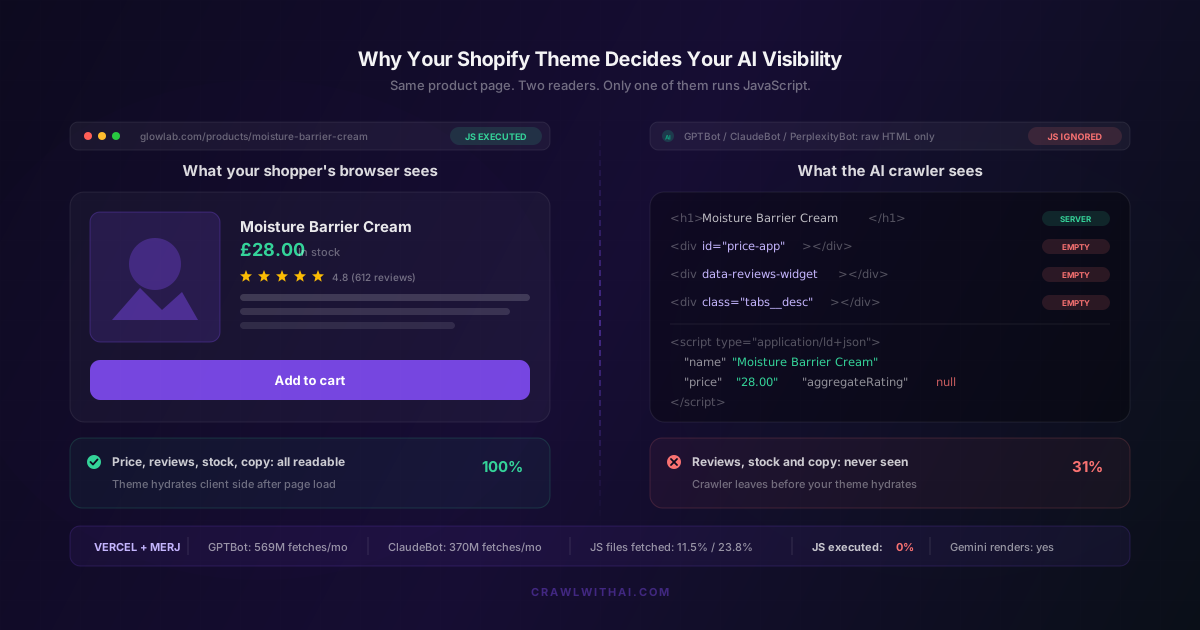
You picked your Shopify theme for how it looked. Maybe it had a nice sticky header, product tabs that kept the page tidy, a review widget that slid in, a quick-view modal that felt fast. Every one of those decisions was made for a human with a browser. None of them were made for the crawler that now decides whether ChatGPT mentions your store.
Here is the part most store owners miss. Your theme is not just a skin. It is the thing that decides which of your product facts exist in the HTML and which ones only appear after JavaScript runs. Google has rendered JavaScript for years, so themes that hide data behind scripts still ranked fine. AI crawlers do not render JavaScript at all. That single difference means two stores with identical products, identical prices, and identical reviews can have completely different AI visibility, purely because of the theme sitting between them and the crawler.
What your Shopify theme actually hands to an AI crawler
When GPTBot requests your product page, it gets one thing: the raw HTML your server returned. No browser. No render pass. No waiting for scripts to hydrate. Whatever is in that first response is your entire pitch.
Your theme controls that response. Liquid runs on Shopify's servers, so anything your theme renders in Liquid arrives in the HTML fully formed. Anything your theme renders with JavaScript, or pulls in from an app that injects content client side, arrives as an empty div and a promise. The shopper's browser keeps that promise. The AI crawler does not stay long enough to see it.
So the question stops being "does my theme look good" and becomes "how much of my product data survives with JavaScript switched off". Most store owners have never asked it.
The Vercel finding that should change how you pick a theme
In December 2024, Vercel and MERJ published the first large-scale study of how AI crawlers actually behave, based on real traffic across Vercel's network. The headline number for Shopify owners: none of the major AI crawlers render JavaScript. Not GPTBot. Not OAI-SearchBot or ChatGPT-User. Not ClaudeBot. Not PerplexityBot. Not Meta-ExternalAgent, not Bytespider, not CCBot.
The detail is sharper than the headline. ChatGPT's crawler spends 11.50% of its fetches on JavaScript files, and Claude's spends 23.84%. They download your scripts. They just never execute them. They are reading your JavaScript as text, the way they would read a novel, and getting nothing useful about your price or your stock level out of it.
This is not a small crawler with a small appetite. Vercel measured GPTBot at 569 million fetches in a single month and ClaudeBot at 370 million. Combined, they were about 20% of Googlebot's 4.5 billion. That traffic is arriving at your store right now, and it is judging you on your raw HTML.
Why Gemini sees a different store than ChatGPT does
Here is where theme choice gets genuinely strange. Gemini runs on Google's crawling infrastructure, so it inherits Googlebot's full rendering pipeline. It executes your JavaScript. AppleBot renders too, through a browser-based crawler.
So your JavaScript-heavy theme can produce a store that Gemini understands perfectly and ChatGPT barely understands at all. If you have ever wondered why you show up in one AI assistant and not another, and you assumed it was about brand authority or backlinks, check your rendering first. The gap is often mechanical, not reputational. We covered the platform differences in more depth in Shopify SEO vs AI SEO.
This also explains why your Google rankings are a bad proxy for AI visibility. Ranking well proves Googlebot rendered your page. It proves nothing about what GPTBot got.
Where Shopify themes hide product data from AI crawlers
The offenders are predictable once you know what to look for. These are the patterns that show up again and again in premium themes:
Product tabs. Description, ingredients, shipping and returns tucked into tabs. Some themes render all tab content in Liquid and just hide it with CSS, which is fine because the HTML is there. Others fetch tab content on click. Those themes hand the crawler an empty container where your product description should be.
Review widgets. Almost every review app injects its content client side after the page loads. Your 612 reviews and 4.8 average exist in the DOM, not in the HTML. To an AI crawler your product has no social proof at all, which matters because reviews are one of the strongest signals in AI product recommendations.
Price and variant logic. Themes that build the price block in JavaScript so variant switching feels instant. The shopper sees £28.00. The crawler sees <div id="price-app"></div>.
Quick view and infinite scroll on collections. If your collection page loads twelve products in HTML and fetches the rest on scroll, the crawler discovers twelve products. The other 200 are invisible. This is part of why category pages matter more than product pages for discovery, and why a badly built collection page caps your whole catalogue.
App-injected content blocks. Size guides, bundle builders, subscription selectors, trust badges. Each one usually arrives via script tag.
Your JSON-LD is the safety net, and most themes leave holes in it
There is one thing that saves stores here, and it is worth understanding properly. Shopify themes generate structured data through the structured_data Liquid filter, which outputs JSON-LD directly into the HTML. It is server rendered. AI crawlers read it fine, because as Vercel noted, content in the initial HTML response gets picked up even when it is not visible markup.
Dawn and most Dawn-derived themes include Product and Organization schema out of the box. The problem is what the default covers: name, image, price, currency, availability, URL. That is the basics. Description, brand, SKU, GTIN, aggregate rating and review content usually need to be added manually through theme code or a schema app.
So the typical Shopify store gives an AI crawler a product name and a price in JSON-LD, an empty div where the reviews should be, and an empty div where the description should be. Then the owner wonders why ChatGPT recommends a competitor who writes long server-rendered descriptions. See how structured data changed e-commerce SEO for the wider picture.
How to check what your theme actually serves
This takes five minutes and you do not need a developer.
Open your product page, right click, and choose View Page Source. That is the raw HTML, before JavaScript. Do not use Inspect Element, which shows you the rendered DOM and will lie to you about this. Now use Ctrl+F and search for your price. Search for a distinctive sentence from your product description. Search for your star rating. Search for a review quote.
Whatever you cannot find in View Page Source, the AI crawler cannot find either.
For a harder test, disable JavaScript in your browser (Chrome DevTools, Command Menu, "Disable JavaScript") and reload the page. What remains is roughly what GPTBot works with. If your product page collapses into a header and a spinner, you have found your AI visibility problem.
Also check that the crawlers are allowed in at all before you rebuild anything. A blocked crawler makes the rendering question moot, and Shopify stores block AI bots more often than owners realise. We walked through it in the Shopify robots.txt settings that block AI crawlers.
Theme fixes that improve AI visibility this week
You do not need to rebuild your store. You need to move a handful of facts from JavaScript into HTML.
Start by rendering your full product description in Liquid, always, even if you visually hide part of it behind tabs. Hidden HTML still counts. Absent HTML does not.
Next, get your ratings into JSON-LD server side. Most review apps expose a metafield with the aggregate rating and review count. Pull that metafield into your product schema in Liquid rather than relying on the app's client-side injection. This one change typically does more for AI visibility than anything else on the list, because it turns your strongest trust signal from invisible into machine-readable. Product reviews carry real weight in AI recommendations, but only the ones the crawler can see.
Then fill in the schema gaps: brand, SKU, description, GTIN where you have it. Shopify metafields make this manageable without touching every product.
Make sure collection pages render a meaningful number of products in HTML before any scroll or filter JavaScript kicks in. And put your shipping and returns policy in server-rendered text on the product page, not in a modal.
Worth noting: Shopify's own theme guidance already points this way. Their performance docs tell theme developers to build primarily with HTML and CSS, treat JavaScript as progressive enhancement, and keep minified JS bundles at 16 KB or less. Themes that follow that advice are accidentally excellent for AI visibility. Themes that ignore it are accidentally terrible. The Theme Store only requires a minimum average Lighthouse score of 60, which leaves a lot of room for heavy themes to pass.
How CrawlWithAI shows you the gap
The awkward part of all this is that you cannot see the problem from inside your store. Your theme looks perfect to you, because you are looking at it in a browser that runs JavaScript. The crawler's view is invisible to the person who most needs to see it.
CrawlWithAI closes that loop. It reads your store the way GPTBot and PerplexityBot read it, raw HTML only, and shows you exactly which product facts survive and which ones vanish. It flags the empty containers, the missing schema fields, and the review data your theme is rendering client side. Then it tracks whether ChatGPT, Perplexity and Gemini actually recommend your products, and attributes the revenue those recommendations drive, so you can see whether a theme fix moved anything real.
That last part matters. Plenty of AI SEO advice is guesswork. Being able to change one thing in your theme and watch citations and revenue respond turns it into something you can manage.
Frequently asked questions
Do AI crawlers render JavaScript?
No. Vercel and MERJ's network-wide study found that GPTBot, OAI-SearchBot, ChatGPT-User, ClaudeBot, PerplexityBot, Meta-ExternalAgent and Bytespider all fail to execute JavaScript. Gemini and AppleBot are the exceptions, because both use browser-based rendering infrastructure.
Is Dawn a good theme for AI visibility?
Yes, relatively. Dawn renders most content server side in Liquid and includes Product and Organization schema by default. Its weakness is the same as every theme's: the default schema is sparse, and any review app you install will still inject ratings client side unless you wire the metafield into your Liquid.
Will switching themes fix my AI visibility?
Usually not on its own, and it is rarely the cheapest fix. Most of the gap comes from a few specific fields, description, ratings, price, being client rendered. Fixing those in your current theme is faster than a migration and gets you most of the benefit.
Does a heavy theme hurt AI visibility the same way it hurts page speed?
Not quite. Page speed suffers from total JavaScript weight. AI visibility suffers from what depends on JavaScript. A theme could load 800 KB of scripts and still be perfectly readable if all the product facts are in the Liquid-rendered HTML. The two problems overlap but they are not the same, which is why the store speed checklist is a separate job.
How do I know if my theme is the problem and not my products?
View Page Source on a product page and search for your price, description and rating. If they are missing, your theme is the problem. If they are all there and you are still not getting recommended, the issue is upstream: crawler access, content depth, or category competition.
Sources
- Vercel and MERJ, The rise of the AI crawler
- Vercel and MERJ, How Google handles JavaScript throughout the indexing process
- Shopify, Performance best practices for Shopify themes
- Shopify, Ecommerce schema: your structured data guide
- Shopify, structured_data Liquid filter reference
- OpenAI, Crawlers and user agents documentation