Your best month just closed. Revenue is up, and in your Shopify analytics most of it sits in one bucket labelled Direct. That bucket feels like a win until you notice what it really is. Direct is where analytics files every order it cannot explain. In 2026, a fast-growing share of what it cannot explain started inside an AI answer.
A customer asked ChatGPT for the best merino base layer, saw your brand named in the reply, and typed your URL two days later. Your reports call that Direct. A revenue attribution model that includes AI channels is what turns that anonymous order back into a traceable one. You need it because the money is real. Traffic to US retail sites from generative AI sources rose 393% year over year in the first quarter of 2026, according to Adobe Analytics. Here is how to build the model, step by step.
Why Your Current Attribution Model Cannot See AI Channels
Most attribution setups were built for a click economy. A customer clicks an ad, the click carries a tag, the tag lands in analytics, the sale gets credited. AI recommendations break that chain at the first link.
There are three reasons AI traffic goes missing. First, many AI platforms do not pass a referrer header. When a customer taps a link inside the ChatGPT mobile app, the session often arrives with no source attached, so it defaults to Direct. Second, the links AI platforms generate almost never carry UTM parameters, because no marketer built the URL, a failure we covered in why UTM parameters break when traffic comes from ChatGPT. Third, a chat interface is not a web page in the tracking sense. It does not fire pixels or join the click ecosystem analytics platforms expect.
The result is quiet but expensive. A big slice of your Direct bucket is not loyalists typing your name from memory. It is AI-referred demand in disguise, and treating all of it as branded traffic is one of the costliest errors in Shopify analytics, as we covered in why direct traffic is not all branded.
What a Revenue Attribution Model Actually Needs to Do in 2026
A dashboard shows you numbers. A revenue attribution model makes a decision about which touchpoint earned which dollar. Those are different jobs, and you need the second one.
The context is not subtle. Gartner predicted that traditional search engine volume would drop 25% by 2026 as buyers move queries to AI chatbots and virtual agents. Salesforce found that 39% of consumers, and more than half of Gen Z, already use AI for product discovery. The channel is not emerging anymore. It is here, and it converts: Adobe reported that AI-referred visitors converted 42% better than other traffic in March 2026, a reversal from a year earlier.
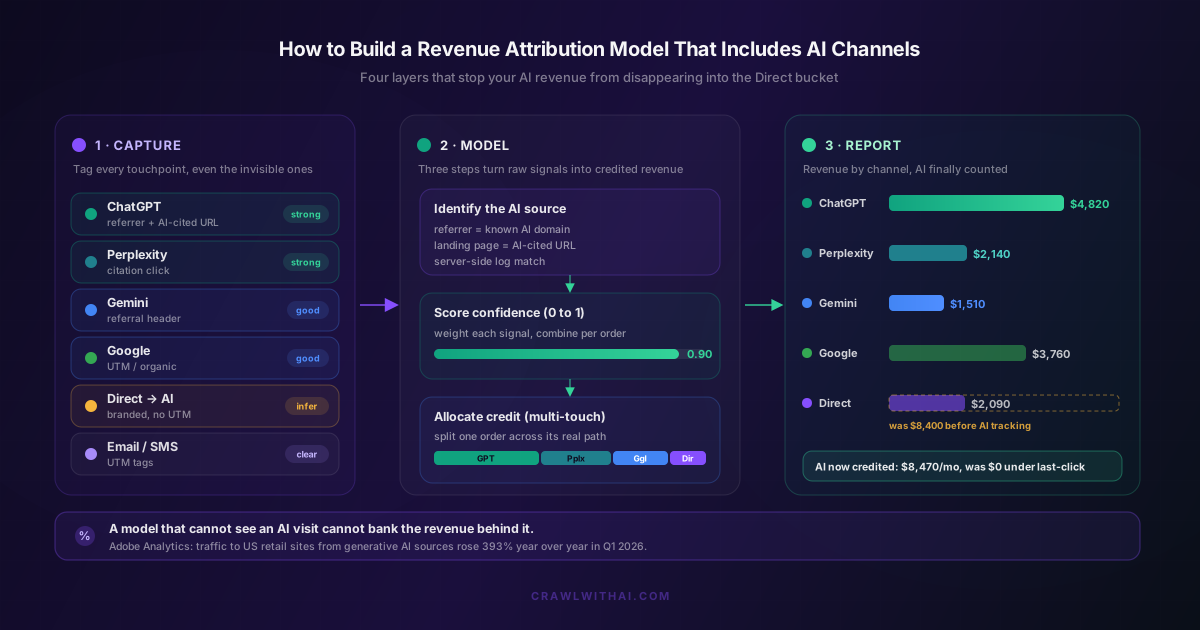
So the model has four jobs. Capture the signals that betray an AI visit. Score how confident you are that AI drove a given order. Allocate credit across the real path the customer took. Reconcile against your actual Shopify revenue so the numbers add up. Skip any one layer and the model produces a number you cannot defend in a budget meeting.
Step 1: Capture the Signals That Reveal AI Traffic
You cannot attribute what you never recorded. Layer one, capture, happens before any credit rules exist.
Start with referrer domains. Log the full referrer on every session and match it against known AI hosts: chatgpt.com and chat.openai.com for ChatGPT, perplexity.ai, gemini.google.com and the Google AI surfaces, plus copilot.microsoft.com and x.com for Grok. When one appears, you have a high-certainty AI referral. Record it as its own channel, not as Other.
Next, capture the landing page. AI platforms tend to send buyers deep into your catalogue, straight to a specific product or comparison page rather than the homepage. A session that lands on a long product URL with no campaign tag, from a browser with no prior session, is a classic AI signature even when the referrer is stripped. Save the landing path on every order to spot the pattern.
Then move capture server-side. Client-side pixels miss the sessions that matter most, because privacy features and app browsers block them. Server-side logging records the request headers before anything can strip them, recovering a meaningful share of the AI referrals that browser analytics drops. If your store leans on Shopify's built-in reporting alone, read why Shopify analytics misses AI-referred orders before you trust those totals.
Step 2: Score Each Order by Confidence
Real AI attribution is rarely a clean yes or no. A session with a perplexity.ai referrer and a deep product landing page is close to certain. A branded Direct visit with no referrer might be AI-driven or a returning customer. Forcing both into a binary throws away information.
The fix is a confidence score between 0 and 1 for every order. Each signal adds weight: a known AI referrer might contribute 0.9, an AI-cited landing URL adds another chunk, a click inside a sensible attribution window adds more, and a branded Direct hit with no UTM contributes a small, honest amount. Combine the weights and you get a probability, not a guess.
Confidence scoring keeps you honest in both directions. You count the high-confidence orders as AI revenue with a clear conscience and flag the ambiguous ones for review instead of inflating your totals. We walk through the weighting in how confidence scoring works in AI revenue attribution. A scored order tells you how much to trust it, and that number travels with the revenue everywhere it goes.
Step 3: Choose a Credit Allocation Method That Is Fair to AI
Now you decide how to split credit when a customer touched more than one channel. This is where most models silently bury AI, so choose deliberately.
Last-click is the default in Shopify and many analytics tools, and it is the worst choice for AI channels. AI discovery happens early. The AI names your brand, the customer researches, then buys days later through a direct visit. Last-click hands 100% of that credit to the final step and zero to the AI that started it. Our post on why last-click attribution misses most AI-driven revenue shows how large that gap gets.
Time-decay has the same disease. It gives more weight to touchpoints near the purchase, which means it consistently underrates the early AI touch. For a model that is trying to reveal AI value, both of these will lie to you.
The fair options are linear and position-based. Linear splits credit evenly across every touch, so the AI that opened the journey is counted alongside the search and email that closed it. Position-based, or U-shaped, gives extra weight to the first and last touch, which fits AI-influenced buying because it rewards both discovery and conversion. We break down each model in how multi-touch attribution models handle AI referrals differently. Pick one, write it down, and apply it the same way every time.
Step 4: Reconcile the Model Against Real Shopify Revenue
A model that does not tie back to real orders is a fantasy with charts. Layer four is reconciliation, and it is the step people skip.
Take the AI-attributed revenue your model produces and check it against your actual Shopify orders for the same period. The totals across all channels must equal your real revenue, no more and no less. If your channels sum to more than you sold, you are double counting, usually crediting one journey to both an AI touch and a branded search. Confidence scores help: weight the shared order rather than count it twice.
Reconciliation also gives you a baseline you can defend. Keep a clear Direct figure you have not reclassified, and show how much moved out of it and where it went. When a $9,000 Direct bucket becomes $2,000 of true Direct plus $7,000 across ChatGPT, Perplexity and Gemini, the story holds up because the total still matches the till. That is the difference between a model a CFO trusts and a dashboard they ignore.
The Mistake That Breaks Most AI Revenue Attribution Models
Here is the trap. Teams get excited about attribution models, pick linear or position-based, switch the setting in GA4, and expect AI revenue to appear. It does not, because they skipped layer one.
An attribution model can only assign credit to touchpoints it can see. If your ChatGPT sessions are still arriving as Direct, the fanciest multi-touch model in the world will faithfully credit Direct. The allocation method is the last decision in the build, not the first: solve identification, then scoring, then allocation.
The second mistake is over-claiming. Once you find hidden AI revenue, it is tempting to credit every unexplained Direct order to AI, which destroys the trust you are building. Keep the confidence scores visible, keep a conservative Direct baseline, and let the high-confidence orders make the case on their own. A model that admits what it does not know is the one people believe.
How CrawlWithAI Builds This Model For You
You can assemble all four layers by hand with server-side logging, a data warehouse, and someone who maintains the referrer list every time an AI platform changes its URLs. Most Shopify teams do not have that time. This is the exact problem CrawlWithAI was built to solve.
CrawlWithAI works from the AI side of the journey. It monitors when ChatGPT, Perplexity, Gemini and other platforms reference your store, tracks which mentions and recommendations drive clicks, and ties that activity to orders in your Shopify store. Identification happens from real AI platform activity, not from browser referrer headers that may not survive the trip. Confidence scoring sits on top, so each AI-attributed order carries a probability you can act on, and the totals reconcile against your Shopify revenue.
That means the four layers in this guide arrive already built and maintained. You get a revenue attribution model that includes AI channels without hand-coding the capture layer or babysitting a list of AI domains. If you have already set up AI traffic attribution in Google Analytics 4, CrawlWithAI gives you the clean AI-order signal that makes those GA4 models finally work.
FAQ
What is a revenue attribution model that includes AI channels? It is a system that credits sales to the channels that drove them, with AI platforms like ChatGPT, Perplexity and Gemini treated as first-class channels rather than lumped into Direct. It captures AI signals, scores each order by confidence, allocates credit across the buyer's path, and reconciles against real Shopify revenue.
Why does AI traffic show up as Direct in my analytics? Because many AI platforms do not pass a referrer header, and the links they generate carry no UTM parameters. With no source attached, analytics defaults the session to Direct. Server-side logging and landing-page pattern matching recover a large share of these sessions.
Which attribution model is best for AI channels? Linear or position-based. Both give credit to the early AI touch that starts most journeys. Avoid last-click and time-decay, which weight the final step and hide AI discovery almost completely.
Do I need to replace Google Analytics to attribute AI revenue? No. GA4 supports linear and data-driven models already. The missing piece is clean identification of AI sessions before they reach the model. Solve that with server-side capture or a tool like CrawlWithAI, and your existing GA4 models start crediting AI correctly.
How do I avoid over-counting AI revenue? Use confidence scores, keep a conservative Direct baseline you do not reclassify, and reconcile your channel totals against actual Shopify orders. If the channels sum to more than you sold, you are double counting a shared journey.
Sources
- Adobe Analytics, AI Traffic to US Retailers Q1 2026 (via TechCrunch): https://techcrunch.com/2026/04/16/ai-traffic-to-us-retailers-rose-393-in-q1-and-its-boosting-their-revenue-too/
- Adobe Blog, Traffic to US Retail Websites from Generative AI Sources Jumps 1,200 Percent: https://blog.adobe.com/en/publish/2025/03/17/adobe-analytics-traffic-to-us-retail-websites-from-generative-ai-sources-jumps-1200-percent
- Gartner, Search Engine Volume Will Drop 25% by 2026: https://www.gartner.com/en/newsroom/press-releases/2024-02-19-gartner-predicts-search-engine-volume-will-drop-25-percent-by-2026-due-to-ai-chatbots-and-other-virtual-agents
- Salesforce, Consumer Shopping AI Trends 2025: https://www.salesforce.com/news/stories/consumer-shopping-ai-trends-2025/