Picture two Shopify stores selling the same waterproof trail-running shoe. Same price, same photos, same 600 reviews. Both are built on Hydrogen. Ask ChatGPT for "waterproof trail runners under £150" and one store gets named. The other never comes up. The products are identical. The difference is a single line in a route loader that neither owner thinks about.
That is the strange thing about Hydrogen and AI search. Hydrogen is Shopify's headless framework, it is React-based, it runs on edge workers, and it is genuinely fast. But fast is not the same as readable. AI crawlers read your raw HTML and nothing else. A Liquid theme renders on Shopify's servers, so its HTML arrives fully formed. Hydrogen renders with your code, and your code decides which product facts land in the first HTML response and which ones stream in a moment later. That choice is invisible to you in a browser, and it quietly controls whether GPTBot, Perplexity and Claude ever see your store.
What makes Shopify Hydrogen different from a Liquid theme
A Liquid theme gives you no rendering decision to make. Liquid runs on Shopify's infrastructure, the page is assembled server side, and the HTML that comes back already contains your title, price and description. You can build it badly, but the default is server-rendered.
Hydrogen is a different animal. It is a React Router application, the framework that grew out of Remix, running on Oxygen, Shopify's edge worker platform. Every request hits an Oxygen worker near the shopper, which matches the route, queries the Storefront API over GraphQL, and returns HTML. The part that matters for AI search: with Hydrogen, you choose how that HTML gets produced. Full server-side rendering, streaming, or client-only. The mode you pick is the single most consequential decision on the whole build, and nobody makes it on a Liquid theme, because it was made for them.
Why "Hydrogen is fast" does not mean "Hydrogen is readable"
Hydrogen was designed to be quick. Edge rendering plus streaming can produce a sub-second first paint, the number the agency demo shows you. An AI crawler does not care about paint speed. It requests the page, reads the first HTML response, and moves on. A fast render helps nothing if the facts are not in that response.
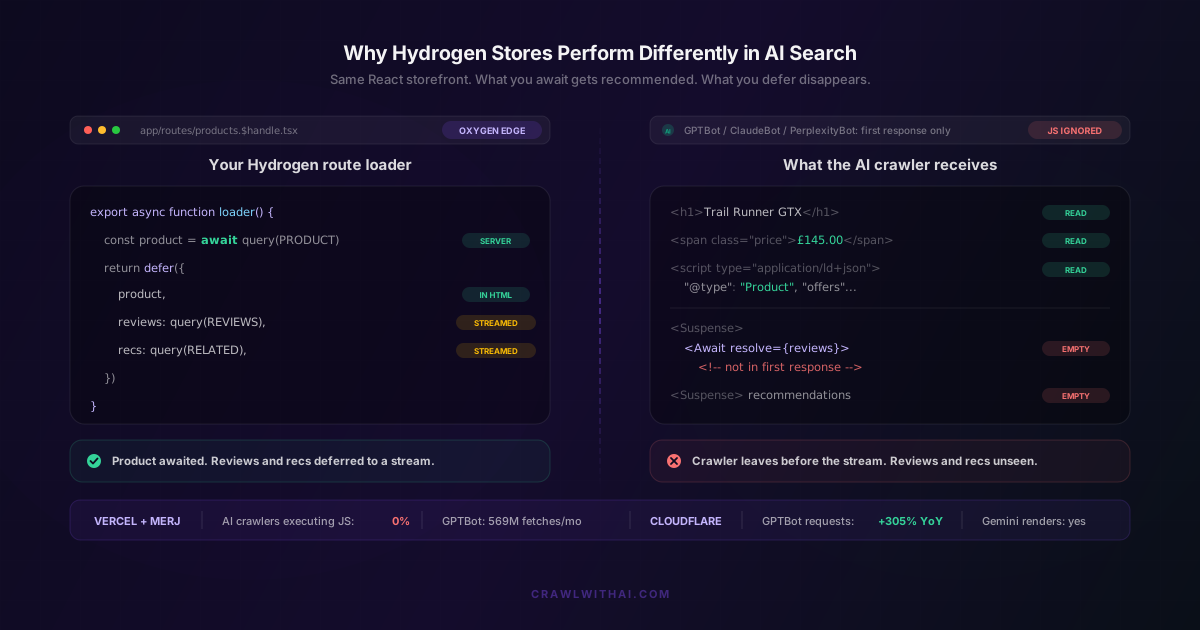
The evidence here is not opinion. In their December 2024 network study, Vercel and MERJ found that none of the major AI crawlers execute JavaScript, including GPTBot, ChatGPT-User, ClaudeBot and PerplexityBot. They measured GPTBot at 569 million fetches in a single month and ClaudeBot at 370 million, so this is real volume hitting real stores. The sharp detail: ChatGPT's crawler downloads JavaScript files in 11.50% of its fetches and Claude's in 23.84%, then executes none of it. They read your scripts as text and learn nothing about your price. A Hydrogen page that looks instant to you can still be a blank page to GPTBot.
The three rendering modes and what each one hands an AI crawler
Hydrogen produces HTML in one of three ways, and each hands the crawler something different.
Full SSR waits for every loader on the route to resolve before sending any HTML. The crawler receives a fully populated page: title, price, description, schema, all of it. Slower to first byte, but it is the mode that works for AI search.
Streaming SSR sends the document shell immediately and streams in the slower chunks as they resolve, through React Suspense boundaries. The crawler gets whatever you resolved synchronously. Anything you deferred may not arrive before it leaves.
Client-only rendering sends a near-empty shell and builds the rest in the browser. To an AI crawler that is close to a blank page, because the browser step never happens.
Default to full SSR for commerce routes. Streaming is fine too, but only if you know exactly what you are streaming, which is where most Hydrogen stores get into trouble.
The streaming trap that hides your price from GPTBot
Here is the specific pattern that breaks AI visibility on Hydrogen. Remix and React Router give you a defer API, and a route loader can return something like defer({ product, reviews, recommendations }). The idea is sensible: resolve the important data fast, and stream the slow, secondary data in afterwards so shoppers do not wait.
It works beautifully for humans and can quietly wreck you for AI search. If the product sits in the awaited part of the loader, GPTBot sees it. If your reviews and recommendations are deferred, they stream in through a Suspense boundary the crawler never waits for. Your 600 reviews and 4.8 rating exist, but not in the first HTML response, so to an AI crawler your product has no social proof at all. Reviews are one of the strongest signals in AI product recommendations, which makes this an expensive place to lose data. We went deep on that in the role of product reviews in AI recommendations.
The truly costly mistake is deferring the wrong field. A developer trying to shave time off first byte defers the price block, or the availability, or the description, because it feels non-critical to render speed. Anything that belongs in your Product or Offer JSON-LD belongs in the synchronous loader. The rule is simple: await everything an AI answer would quote, defer only the things it would not.
Why Gemini and Googlebot forgive what ChatGPT punishes
If you have ever seen your Hydrogen store show up in Gemini but not in ChatGPT, the cause is almost always mechanical, not reputational.
Googlebot executes JavaScript, but on a delay. It uses two-pass indexing, where the render is queued behind the initial crawl and can lag by hours or days. Gemini inherits Google's rendering pipeline, so it runs your JavaScript. AppleBot renders through a browser-based crawler too. GPTBot, PerplexityBot and ClaudeBot do none of this. So a client-rendered or over-deferred Hydrogen route can rank on Google, appear in Gemini, and stay invisible to the AI assistants growing fastest. Cloudflare reported GPTBot requests grew 305% year over year, its share of AI crawl rising from 2.2% to 7.7%, so the invisible channel is not staying small. We unpacked the platform split in Shopify SEO versus AI SEO.
The practical takeaway: your Google ranking proves Googlebot rendered your page. It proves nothing about what GPTBot received. Treat them as two different tests.
The canonical and JSON-LD mistakes specific to Hydrogen
Because Hydrogen is your code rather than Shopify's, it introduces failure modes a Liquid theme cannot. Two show up in almost every audit.
The first is the canonical tag injected client side, usually through a useEffect that runs after hydration. The shopper's browser sets it. The crawler, which never hydrates, sees a page with no canonical or the wrong one. Emit the canonical in the server-rendered head through your route meta export, every time.
The second is Product JSON-LD built from a client-side fetch. The rendered HTML then contains no schema at all, which strips out the cleanest way for an AI crawler to read your name, price, brand and offer. Generate the schema in the route loader and print it into the SSR response inside a server-rendered script tag. Structured data is the safety net that survives even when visible markup does not, which is why structured data reshaped e-commerce SEO and why it matters more for machines that never run your scripts. For the crawler's-eye view of what gets parsed, see what GPTBot actually reads.
How to check what your Hydrogen store serves to AI search
You can test this in ten minutes without a developer.
Open a product page, right click, and choose View Page Source. That is the raw HTML before any JavaScript, which is close to what GPTBot works with. Do not use Inspect Element, because it shows the rendered DOM and will tell you your data is present when it is not. Use Ctrl+F to search that source for your price, a distinctive sentence from your description, your star rating, and a review quote. Anything you cannot find, the crawler cannot find either.
For a harder check, request the page the way a crawler does, with no browser at all. A plain curl of the product URL returns exactly the first HTML response. If your price and reviews are missing from that output, they are deferred or client-rendered, and you have found the problem. You can also disable JavaScript in Chrome DevTools and reload. If the page collapses to a header and a spinner, that is your AI search visibility, live.
While you are in there, confirm the crawlers are allowed in at all, and that your Oxygen preview hostnames are blocked from indexing. A blocked crawler makes the rendering question moot, and Shopify stores get this wrong more than owners expect, as we covered in the robots.txt settings that block AI crawlers. The Liquid-theme version of this problem is worth a read too: why your Shopify theme decides your AI visibility.
How CrawlWithAI shows you the gap
The hard part is that you cannot see the problem from inside your store. Your Hydrogen build looks flawless to you, because your browser runs every script and waits for every stream. The crawler's view, the one that decides whether you get recommended, is the one you never see.
CrawlWithAI reads your store the way GPTBot and PerplexityBot read it, first HTML response only, and shows you which product facts survive and which vanish. It flags the empty Suspense containers, the schema missing from the SSR output, and the reviews your loader deferred out of reach. Then it tracks whether ChatGPT, Perplexity and Gemini actually recommend your products, and attributes the revenue those recommendations drive. That last part is what makes it usable. You can move reviews from deferred to awaited in a single loader, then watch whether citations and revenue respond instead of guessing. On a headless build, where every rendering decision is yours, that feedback loop is the difference between managing AI visibility and hoping for it.
Frequently asked questions
Is Hydrogen bad for AI search?
No. Hydrogen is neutral. A Hydrogen store built with full SSR, with product data and JSON-LD in the server response, is excellent for AI search. The problems come from client-only rendering or from deferring indexable content. The framework gives you the power to render correctly and the freedom to render badly, and the outcome depends entirely on how the routes are built.
Does Hydrogen's streaming SSR hurt AI visibility?
Only when you defer the wrong things. Streaming is safe if the product, price, availability and JSON-LD are resolved synchronously in the loader, and you defer only secondary sections like recommendations or a reviews carousel. It becomes a problem when a developer defers a field that belongs in the initial HTML to improve time to first byte.
Will Googlebot see my client-rendered Hydrogen page even if GPTBot cannot?
Usually yes, eventually. Googlebot executes JavaScript through two-pass indexing, and Gemini uses that same rendering, so both can pick up client-rendered content after a delay. GPTBot, PerplexityBot and ClaudeBot never will, because they do not run JavaScript at all. A page that ranks on Google can be invisible in ChatGPT.
Is Hydrogen better or worse than a Liquid theme for AI recommendations?
It depends on the configuration. A Liquid theme is server-rendered by default, so its baseline is safer. Hydrogen can beat it, because full SSR on edge workers is both fast and completely readable, but Hydrogen can also fall below it if key data is deferred or client-rendered. Liquid protects you from yourself. Hydrogen does not.
Sources
- Vercel and MERJ, The rise of the AI crawler
- Cloudflare, From Googlebot to GPTBot: who is crawling your site in 2025
- Shopify, Hydrogen framework documentation
- Shopify, Fetching data with Hydrogen in Remix (defer and Await)
- Shopify, Oxygen hosting overview
- Google Search Central, Understand the JavaScript SEO basics